What is the Model Context Protocol? Architecture: Host ↔ Client ↔ Server
Module 0 — Foundations
MCP (Model Context Protocol) is an open standard that lets AI applications connect to external systems in a consistent, secure way. Think of it like USB-C for AI: instead of every tool or data source needing a custom integration, MCP provides one protocol that hosts (AI apps) and servers (tool/data providers) can both speak.
This article focuses on the core architecture so you have a clear mental model before we write any code with the official TypeScript SDK v2.
The Three Participants
MCP uses a Host ↔ Client ↔ Server model. A single Host can talk to many Servers, but it does so through dedicated Clients.
1. MCP Host
The Host is the AI application itself (Claude Desktop, Claude Code, Cursor, VS Code, or a custom agent you build).
Responsibilities:
Runs the LLM and owns the conversation
Creates and manages one Client per Server
Enforces security, user consent, and authorization
Aggregates context coming back from all Servers
Coordinates sampling / tool use decisions
The Host never talks directly to a Server. It always goes through a Client.
2. MCP Client
Each Client lives inside the Host and has a strict 1:1 relationship with one Server.
Responsibilities:
Maintains the connection to exactly one Server
Attaches protocol version, client info, and capabilities to every request
Routes JSON-RPC messages in both directions
Manages subscriptions and notifications
Preserves isolation between different Servers
3. MCP Server
A Server is a focused program that exposes capabilities:
Tools — functions the model can call (e.g., “get weather”, “query database”)
Resources — data the model or user can read (files, records, etc.)
Prompts — reusable message templates
Servers can run:
Locally via the stdio transport (the Host launches them as subprocesses)
Remotely via Streamable HTTP (any number of Clients can connect)
Servers are intentionally simple and isolated. They do not see the full conversation or other Servers. The Host keeps that control.
Visual Overview
The diagram below shows one Host managing three Clients, each connected to a different Server (two local, one remote).
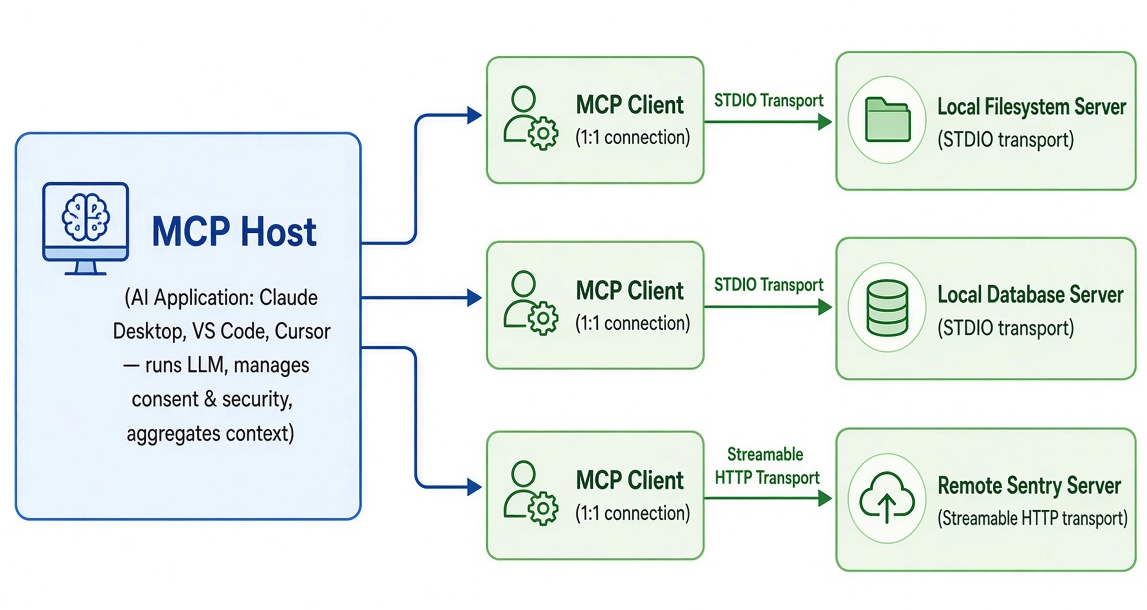
One Host, one Client per Server. Local servers use stdio; remote servers use Streamable HTTP. The protocol itself is the same.
Why This Design?
The architecture is guided by a few clear principles:
Servers should be extremely easy to build — the Host handles orchestration, consent, and the LLM loop.
Servers should be highly composable — you can mix a filesystem server, a GitHub server, and a custom internal API server without them knowing about each other.
Strong isolation — a Server only receives the context it needs for the current request. It cannot read the whole chat or peer into other Servers.
Progressive features — core protocol is minimal; extra capabilities are negotiated.
Communication is built on JSON-RPC 2.0. In the modern 2026-07-28 specification (the one this tutorial uses), the protocol is stateless: every request carries its own protocol version and client capabilities. This makes remote servers easy to scale.
How This Maps to the TypeScript SDK
In the official TypeScript SDK v2 you will use:
@modelcontextprotocol/server → to build Servers (McpServer, registerTool, etc.)
@modelcontextprotocol/client → to build Clients or full Hosts
When you later run serveStdio(createServer), the Host (e.g., Claude Code or the MCP Inspector) is the one that launches your process and creates the Client that talks to it.
What You’ll Do Next
With this mental model in place, the next articles will:
Introduce the three core primitives (Tools, Resources, Prompts)
Set up a project and build your first working Server
Connect that Server to real Hosts
You’re now ready to see how a few lines of TypeScript turn into a tool that any MCP-compatible AI application can use.
Official references
Get new posts by Nelson Lin
Subscribe to receive email notifications when a new article is published.