Tools Deep Dive: Output Schemas, structuredContent, Content Blocks, Annotations & Titles
Module 1 — Your First Server
You already know how to register a tool with an inputSchema. This article covers the other half of a rich tool definition and result:
outputSchema + structuredContent — machine-readable results that clients can validate and code against
Content blocks — text, image, audio, resource_link, and embedded resource (you can mix them)
title and annotations — display names and behavior hints that hosts use for UX (auto-approve vs confirm)
All examples use the official TypeScript SDK v2 (@modelcontextprotocol/server) and the 2026-07-28 protocol era. Zod v4 is the schema library.

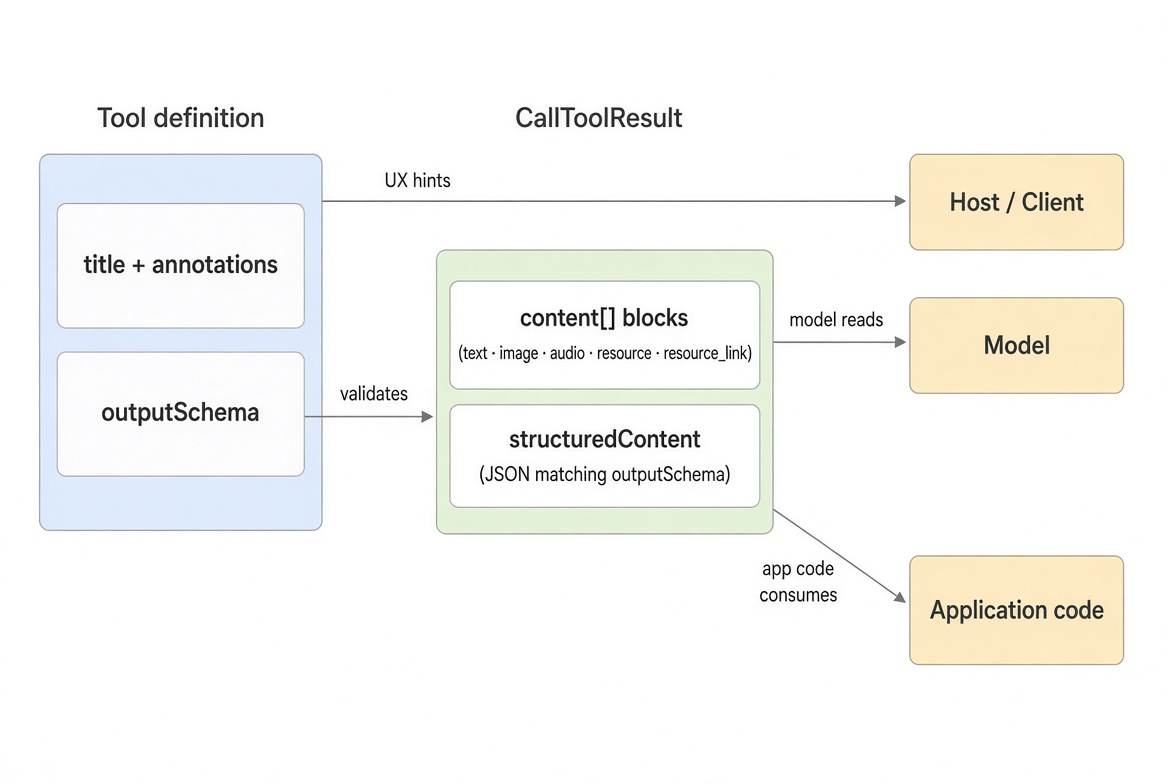
A tool result can carry unstructured content blocks (what the model reads) plus optional structuredContent (what application code consumes). outputSchema describes the latter; title and annotations describe the tool itself.
Concept + Why It Matters
A tool result has two complementary channels:
Channel | Purpose | Who consumes it |
|---|---|---|
| Unstructured blocks (text, image, audio, resource links, embedded resources) | Model and human-facing UI |
| JSON value matching an optional | Application code, typed clients, views |
content is always present (it can be an empty array). structuredContent is optional. When you declare an outputSchema, the SDK validates structuredContent before the result leaves your server, and advertises the derived JSON Schema in tools/list so clients can validate too.
In the 2026-07-28 spec, structuredContent can be any JSON value (object, array, string, number, boolean, or null). Earlier protocol eras required a JSON object. For backwards compatibility, when you return structured content you should also include the serialized JSON as a text content block so older clients still get something readable.
title and annotations never change execution. They are hints clients use to decide what to show the user and whether to auto-approve or require confirmation.
Output Schema + structuredContent
Declare outputSchema alongside inputSchema. Return the matching value as structuredContent and the same data as text in content.
import { McpServer } from '@modelcontextprotocol/server';
import * as z from 'zod/v4';

const catalog = [
  { name: 'Espresso cup', price: 12, category: 'drinkware' },
  { name: 'Travel mug', price: 24, category: 'drinkware' },
  { name: 'Mug rack', price: 36, category: 'storage' }
];

const server = new McpServer({ name: 'catalog', version: '1.0.0' });

server.registerTool(
  'product-details',
  {
    description: 'Look up one product by its exact name',
    inputSchema: z.object({
      name: z.string().describe('Exact product name')
    }),
    outputSchema: z.object({
      name: z.string(),
      price: z.number(),
      category: z.string()
    })
  },
  async ({ name }) => {
    const product = catalog.find(p => p.name === name);
    if (!product) {
      // Prefer isError result over throwing for expected misses
      return {
        content: [{ type: 'text', text: `No product named "${name}"` }],
        isError: true
      };
    }

    const output = {
      name: product.name,
      price: product.price,
      category: product.category
    };

    return {
      // Backwards-compatible text rendering for the model / older clients
      content: [{ type: 'text', text: JSON.stringify(output, null, 2) }],
      // Machine-readable value validated against outputSchema
      structuredContent: output
    };
  }
);
Calling product-details with { name: 'Travel mug' } returns:
{
  "content": [
    {
      "type": "text",
      "text": "{\n  \"name\": \"Travel mug\",\n  \"price\": 24,\n  \"category\": \"drinkware\"\n}"
    }
  ],
  "structuredContent": {
    "name": "Travel mug",
    "price": 24,
    "category": "drinkware"
  }
}
The SDK validates structuredContent against the outputSchema before sending. If validation fails, the result is turned into an isError: true tool result (the handler's return is not forwarded as-is).
Array and primitive outputs (2026-07-28)
Because the current spec allows any JSON value, you can declare an array root:
server.registerTool(
  'list-categories',
  {
    description: 'Return the distinct categories in the catalog',
    outputSchema: z.array(z.string())
  },
  async () => {
    const categories = [...new Set(catalog.map(p => p.category))];
    return {
      content: [{ type: 'text', text: categories.join(', ') }],
      structuredContent: categories
    };
  }
);
Or even a primitive:
server.registerTool(
  'product-count',
  {
    description: 'Return the number of products in the catalog',
    outputSchema: z.number().int().nonnegative()
  },
  async () => {
    return {
      content: [{ type: 'text', text: String(catalog.length) }],
      structuredContent: catalog.length
    };
  }
);
Prefer object shapes when you need named fields or when you must support older protocol eras.
Content Blocks
One result can mix multiple content blocks. Supported types:
Type | Required fields | Notes |
|---|---|---|
|
| Most common. Model-readable. |
|
| PNG, JPEG, WebP, etc. |
|
| WAV, MP3, etc. |
|
| Embeds resource contents inline (no extra |
|
| Points at a resource by URI; client fetches if needed. |
Mixed content example
// Tiny 1x1 transparent PNG and minimal WAV (replace with real files in production)
const tinyPng = 'iVBORw0KGgoAAAANSUhEUgAAAAEAAAABCAQAAAC1HAwCAAAAC0lEQVR42mNkYAAAAAYAAjCB0C8AAAAASUVORK5CYII=';
const tinyWav = 'UklGRiQAAABXQVZFZm10IBAAAAABAAEAQB8AAEAfAAABAAgAZGF0YQAAAAA=';

server.registerTool(
  'product-card',
  {
    description: 'Render one product as an image, spoken name, and catalog record',
    inputSchema: z.object({ name: z.string() })
  },
  async ({ name }) => {
    const product = catalog.find(p => p.name === name);
    if (!product) {
      return {
        content: [{ type: 'text', text: `No product named "${name}"` }],
        isError: true
      };
    }

    return {
      content: [
        // Image block
        {
          type: 'image',
          data: tinyPng,
          mimeType: 'image/png',
          annotations: { audience: ['user'], priority: 0.8 }
        },
        // Audio block
        {
          type: 'audio',
          data: tinyWav,
          mimeType: 'audio/wav'
        },
        // Embedded resource (contents travel with the result)
        {
          type: 'resource',
          resource: {
            uri: `catalog://products/${encodeURIComponent(product.name)}`,
            mimeType: 'application/json',
            text: JSON.stringify(product)
          }
        },
        // Resource link (client can fetch later via resources/read if the server exposes it)
        {
          type: 'resource_link',
          uri: `catalog://products/${encodeURIComponent(product.name)}/full`,
          name: `${product.name} (full record)`,
          mimeType: 'application/json',
          description: 'Extended product details'
        }
      ]
    };
  }
);
Content block annotations
Content blocks (text, image, audio, resource, resource_link) accept an optional annotations object. These are hints the client may use when deciding how to display or route the content. They do not affect tool execution.
{
  type: 'text',
  text: 'Internal debug info — model should ignore this',
  annotations: {
    audience: ['user'],          // "user" | "assistant" (or both)
    priority: 0.2,               // 0.0 (least important) to 1.0 (most important)
    lastModified: '2026-11-06T12:00:00Z'
  }
}audience: Who the content is intended for ("user" and/or "assistant").
A host may hide or de-emphasize content that does not include the current audience (e.g. show ["user"] only in the UI and keep it out of the model context).
priority: Relative importance from 0.0 (entirely optional) to 1.0 (effectively required).
Clients can use it to decide what to surface or collapse when space or context is limited. Many clients ignore it.
lastModified: ISO 8601 timestamp of when the underlying data was last modified.
Useful for freshness indicators, caching, or “updated at” display.
These are the same annotations used on resources. They are optional and purely advisory.
Title and Tool Annotations
title is the human-readable display name. annotations are behavior hints.
Display name precedence (highest first):
title (on the tool config)
annotations.title
name
server.registerTool(
  'clear-catalog',
  {
    title: 'Clear the catalog',
    description: 'Remove every product from the catalog',
    annotations: {
      readOnlyHint: false,
      destructiveHint: true,
      idempotentHint: true,
      openWorldHint: false
    }
  },
  async () => {
    catalog.length = 0;
    return { content: [{ type: 'text', text: 'Catalog cleared' }] };
  }
);
Annotation defaults and meaning
Annotation | Default | Meaning when true | Notes |
|---|---|---|---|
|
| Tool does not modify its environment | Strongest signal for auto-approval |
|
| May perform destructive (delete/overwrite) updates | Only meaningful when |
|
| Calling again with the same args has no further effect | Only meaningful when not read-only |
|
| May interact with external entities (network, other systems) | Affects trust-boundary reasoning |
Important: These are hints, not guarantees. A malicious or buggy server can set readOnlyHint: true and still mutate state. Clients must treat annotations as untrusted unless the server is trusted, and should enforce real permissions at the process/OS level.
Recommended patterns:
Pure lookups → readOnlyHint: true, openWorldHint: false
Additive writes (create, append) → readOnlyHint: false, destructiveHint: false
Deletes / overwrites → destructiveHint: true (and usually idempotentHint: true)
External APIs / web → openWorldHint: true
A tool that takes no arguments simply omits inputSchema.
Full Complete Example
Putting it all together in one server:
import { McpServer } from '@modelcontextprotocol/server';
import { serveStdio } from '@modelcontextprotocol/server/stdio';
import * as z from 'zod/v4';

const catalog = [
  { id: '1', name: 'Espresso cup', price: 12, category: 'drinkware' },
  { id: '2', name: 'Travel mug', price: 24, category: 'drinkware' },
  { id: '3', name: 'Mug rack', price: 36, category: 'storage' }
];

function createServer(): McpServer {
  const server = new McpServer({ name: 'catalog-server', version: '1.0.0' });

  // Structured output
  server.registerTool(
    'get-product',
    {
      title: 'Get Product',
      description: 'Look up a product by ID',
      inputSchema: z.object({
        id: z.string().describe('Product ID')
      }),
      outputSchema: z.object({
        id: z.string(),
        name: z.string(),
        price: z.number(),
        category: z.string()
      }),
      annotations: { readOnlyHint: true, openWorldHint: false }
    },
    async ({ id }) => {
      const product = catalog.find(p => p.id === id);
      if (!product) {
        return {
          content: [{ type: 'text', text: `Product ${id} not found` }],
          isError: true
        };
      }
      return {
        content: [{ type: 'text', text: JSON.stringify(product, null, 2) }],
        structuredContent: product
      };
    }
  );

  // Destructive write
  server.registerTool(
    'delete-product',
    {
      title: 'Delete Product',
      description: 'Permanently remove a product by ID',
      inputSchema: z.object({ id: z.string() }),
      annotations: {
        readOnlyHint: false,
        destructiveHint: true,
        idempotentHint: true,
        openWorldHint: false
      }
    },
    async ({ id }) => {
      const idx = catalog.findIndex(p => p.id === id);
      if (idx === -1) {
        return {
          content: [{ type: 'text', text: `Product ${id} not found` }],
          isError: true
        };
      }
      catalog.splice(idx, 1);
      return { content: [{ type: 'text', text: `Deleted product ${id}` }] };
    }
  );

  return server;
}

void serveStdio(createServer);
console.error('catalog MCP server running on stdio');
Best Practices
Always pair structuredContent with a text block containing the same data (or a human-readable summary) for backwards compatibility.
Prefer object-shaped outputSchema unless you specifically need an array or primitive and only target 2026-07-28 clients.
Set annotations explicitly. The defaults are pessimistic (readOnlyHint: false, destructiveHint: true, openWorldHint: true). Leaving them unset makes hosts treat the tool as risky.
Use isError: true for expected failures (not found, validation after handler, etc.) rather than throwing. Validation failures of structuredContent are automatically turned into error results by the SDK.
Keep content blocks small. For large data, return a resource_link (or register a proper Resource) and let the client fetch it.
Annotate content blocks with audience and priority when you want hosts to treat some blocks as user-only or low-priority.
Recap
outputSchema + structuredContent give clients a validated, machine-readable result alongside the unstructured content blocks the model reads.
In 2026-07-28, structuredContent can be any JSON value; the SDK validates it against the schema you declare.
Content blocks (text, image, audio, resource, resource_link) can be mixed in one result. Images and audio are base64. Embedded resources include their contents; resource links are just references.
title is the display name (precedence: title → annotations.title → name).
Annotations (readOnlyHint, destructiveHint, idempotentHint, openWorldHint) are hints hosts use for confirmation UX. They never change execution and must not be treated as security guarantees.
Next up: deeper error handling patterns and testing structured outputs with the MCP Inspector.
Get new posts by Nelson Lin
Subscribe to receive email notifications when a new article is published.