Prompts: registerPrompt, Argument Schemas, and Message Templates
Module 2 — Core Server Features
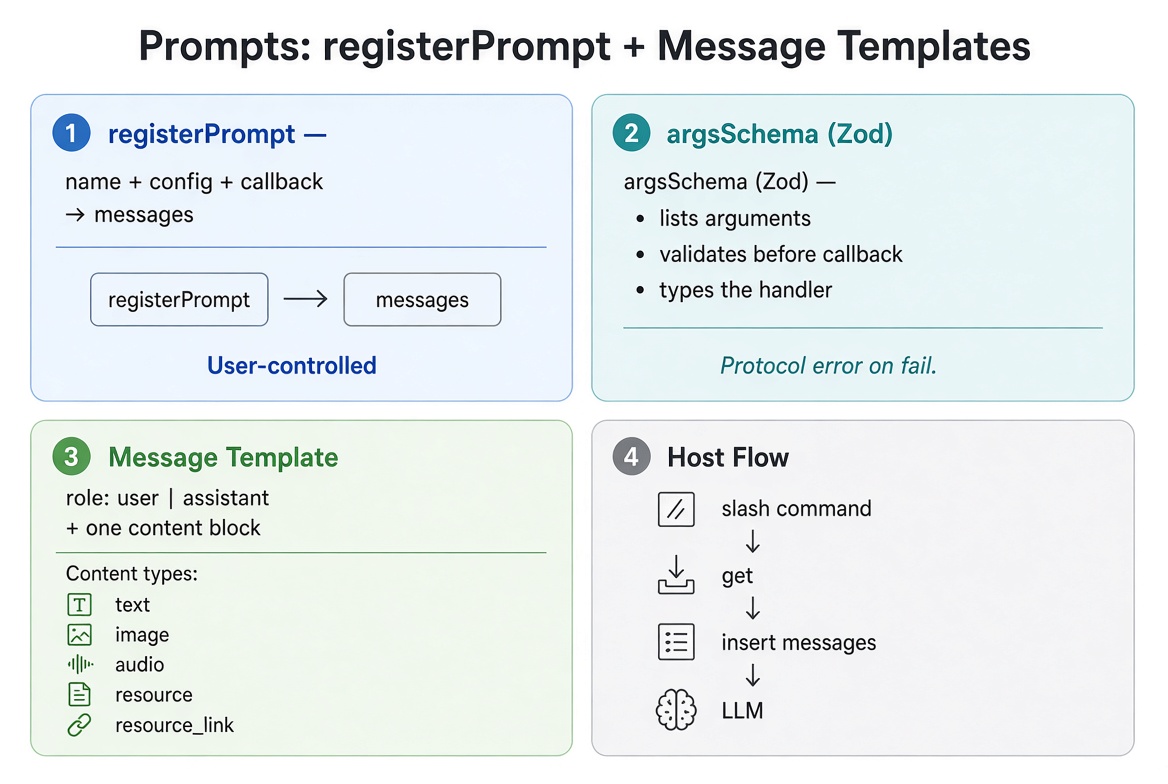
Prompts are user-controlled message templates. Unlike tools (which the model decides to call) or resources (which the host attaches as context), a prompt is explicitly chosen by the user through the host’s UI.
This article covers:
Registering prompts with registerPrompt
Defining argument schemas with Zod (argsSchema)
Building message templates (roles, seeding, content blocks)
Embedding resources and images
How hosts discover, present, and invoke prompts
A complete, runnable catalog example
All code uses the official TypeScript SDK v2 (@modelcontextprotocol/server) and the 2026-07-28 protocol era.

The user selects a prompt (slash command or menu). The host calls prompts/get with the supplied arguments. The server validates against argsSchema and returns a ready-to-use messages array. The host inserts those messages and continues the conversation with the LLM.
Concept + Why It Matters
Aspect | Tools | Resources | Prompts |
|---|---|---|---|
Who controls? | The model | The host / user | The user |
Purpose | Take actions | Provide read-only context | Supply reusable message templates |
Typical UI | Model tool call | Resource picker / auto-attach | Slash commands, menus, command palette |
Registration |
|
|
|
Schema |
| URI template |
|
Returns | Content blocks (+ optional structured) | Resource contents |
|
Prompts are ideal for standardized, deliberate workflows: code review, ticket triage, summarization, translation, incident analysis, etc. You design the exact messages the model will see; the user just fills in the blanks.
Register a Prompt
registerPrompt takes a name, a config object, and a callback that returns messages.
import { McpServer } from '@modelcontextprotocol/server';
import * as z from 'zod/v4';

const server = new McpServer({ name: 'catalog', version: '1.0.0' });

server.registerPrompt(
  'review-code',
  {
    title: 'Code Review',
    description: 'Review code for best practices and potential issues',
    argsSchema: z.object({
      code: z.string().describe('The code to review')
    })
  },
  ({ code }) => ({
    messages: [
      {
        role: 'user',
        content: {
          type: 'text',
          text: `Review this code for best practices and potential issues:\n\n${code}`
        }
      }
    ]
  })
);
After registration:
prompts/list advertises the prompt with its title, description, and argument schema.
prompts/get with a name and arguments runs the callback and returns the filled-in messages.
The name is what clients use when calling prompts/get. The optional title is the friendly name shown in host UIs.
Argument Schemas
argsSchema is a Zod object schema (Standard Schema). From this single schema the SDK:
Advertises the arguments in prompts/list (including descriptions from .describe()).
Validates the arguments supplied to prompts/get before your callback runs.
Infers the TypeScript types for the callback parameters.
server.registerPrompt(
  'summarize-product',
  {
    title: 'Product Summary',
    description: 'Generate a customer-facing summary of a product',
    argsSchema: z.object({
      sku: z.string().describe('Exact product SKU'),
      tone: z.enum(['professional', 'casual', 'terse']).default('professional'),
      maxWords: z.number().int().min(20).max(200).optional()
    })
  },
  ({ sku, tone, maxWords }) => ({
    messages: [
      {
        role: 'user',
        content: {
          type: 'text',
          text: `Write a ${tone} product summary for SKU ${sku}${
            maxWords ? ` in at most ${maxWords} words` : ''
          }.`
        }
      }
    ]
  })
);
Validation Behavior
If the arguments fail the schema, prompts/get rejects with a protocol error (-32602 Invalid params) before the callback runs:
-32602 Invalid arguments for prompt summarize-product: sku: Invalid input: expected string, received undefinedThis differs from tools. Tool argument failures return { isError: true } so the model can see the error and retry. Prompt validation failures abort the request entirely because the user (not the model) is supplying the arguments.
You can omit argsSchema entirely for prompts that take no arguments. The callback then receives no parameters (or an empty object, depending on how you write it).
Building Message Templates
The callback must return an object with a messages array. Each message has:
role: 'user' or 'assistant'
content: exactly one content block
Seeding the Model’s Reply
Adding a trailing assistant message seeds how the model should begin its response. This is useful for structured outputs or constrained formats.
server.registerPrompt(
  'explain-error',
  {
    description: 'Explain a compiler or runtime error and suggest the smallest fix',
    argsSchema: z.object({
      error: z.string().describe('The full error message')
    })
  },
  ({ error }) => ({
    messages: [
      {
        role: 'user',
        content: {
          type: 'text',
          text: `Explain this error and suggest the smallest fix:\n\n${error}`
        }
      },
      {
        role: 'assistant',
        content: {
          type: 'text',
          text: 'The one-line cause:'
        }
      }
    ]
  })
);
The model sees the assistant message already started and continues from “The one-line cause:”.
Supported Content Types
Type | Shape | Notes |
|---|---|---|
|
| Most common |
|
| Base64-encoded data |
|
| Same shape as image |
|
| Embeds resource contents inline |
|
| Reference; client resolves it |
You can return multiple messages. Each message still contains exactly one content block.
Embedding an Image
server.registerPrompt(
  'describe-image',
  {
    description: 'Write alt text for an image',
    argsSchema: z.object({
      imageBase64: z.string().describe('Base64-encoded PNG or JPEG')
    })
  },
  ({ imageBase64 }) => ({
    messages: [
      {
        role: 'user',
        content: {
          type: 'image',
          data: imageBase64,
          mimeType: 'image/png'
        }
      },
      {
        role: 'user',
        content: {
          type: 'text',
          text: 'Write one concise sentence of alt text for this image.'
        }
      }
    ]
  })
);
Embedding a Registered Resource
You can embed the contents of a resource you have already registered. This avoids an extra resources/read round-trip for the host.
const styleGuide = '- Prefer const over let.\n- No single-letter identifiers.\n- Functions under 30 lines.';

server.registerResource(
  'style-guide',
  'doc://style-guide',
  { mimeType: 'text/markdown', title: 'Style Guide' },
  async (uri) => ({
    contents: [{
      uri: uri.href,
      mimeType: 'text/markdown',
      text: styleGuide
    }]
  })
);

server.registerPrompt(
  'review-against-style',
  {
    title: 'Style Guide Review',
    description: 'Review code against the team style guide',
    argsSchema: z.object({
      code: z.string().describe('The code to review')
    })
  },
  ({ code }) => ({
    messages: [
      {
        role: 'user',
        content: {
          type: 'resource',
          resource: {
            uri: 'doc://style-guide',
            mimeType: 'text/markdown',
            text: styleGuide
          }
        }
      },
      {
        role: 'user',
        content: {
          type: 'text',
          text: `Review this code against the style guide above:\n\n${code}`
        }
      }
    ]
  })
);
The uri in the embedded resource tells the client which registered resource the content came from.
How Hosts Use Prompts
Discovery — The host calls prompts/list. It receives each prompt’s name, title, description, and argument schema.
Presentation — The host surfaces the prompts as slash commands (/review-code), menu items, or command-palette entries.
Argument collection — The user selects a prompt and fills in the arguments (form fields, command arguments, etc.). Hosts may offer autocomplete for arguments marked with completable() (covered in the next article).
Get — The host calls prompts/get with the prompt name and argument values.
Insertion — The host receives the messages array and inserts them into the conversation (or starts a new turn).
Model continues — The LLM sees the filled-in template exactly as you designed it and continues from there.
Example of what the host receives after a user invokes /review-code with some code:
{
  "messages": [
    {
      "role": "user",
      "content": {
        "type": "text",
        "text": "Review this code for best practices and potential issues:\n\nfunction add(a, b) { return a + b }"
      }
    }
  ]
}
Complete Catalog Example
Here is a self-contained factory that registers several realistic prompts. It can be dropped into the same server as the resources example from the previous article.
import { McpServer } from '@modelcontextprotocol/server';
import { serveStdio } from '@modelcontextprotocol/server/stdio';
import * as z from 'zod/v4';

function createServer(): McpServer {
  const server = new McpServer({ name: 'catalog', version: '1.0.0' });

  // 1. Simple code review
  server.registerPrompt(
    'review-code',
    {
      title: 'Code Review',
      description: 'Review code for best practices and potential issues',
      argsSchema: z.object({
        code: z.string().describe('The code to review'),
        language: z.string().optional().describe('Programming language (optional)')
      })
    },
    ({ code, language }) => ({
      messages: [
        {
          role: 'user',
          content: {
            type: 'text',
            text: `Review this${language ? ` ${language}` : ''} code for best practices, bugs, and improvements:\n\n${code}`
          }
        }
      ]
    })
  );

  // 2. Product summary with tone control
  server.registerPrompt(
    'summarize-product',
    {
      title: 'Product Summary',
      description: 'Generate a customer-facing product summary',
      argsSchema: z.object({
        sku: z.string().describe('Exact product SKU'),
        tone: z.enum(['professional', 'casual', 'terse']).default('professional'),
        audience: z.string().optional().describe('Target audience')
      })
    },
    ({ sku, tone, audience }) => ({
      messages: [
        {
          role: 'user',
          content: {
            type: 'text',
            text: `Write a ${tone} product summary for SKU ${sku}${
              audience ? ` aimed at ${audience}` : ''
            }. Focus on benefits, not just features.`
          }
        }
      ]
    })
  );

  // 3. Error explanation that seeds the reply
  server.registerPrompt(
    'explain-error',
    {
      title: 'Explain Error',
      description: 'Explain an error and suggest the smallest fix',
      argsSchema: z.object({
        error: z.string().describe('Full error message and stack if available')
      })
    },
    ({ error }) => ({
      messages: [
        {
          role: 'user',
          content: {
            type: 'text',
            text: `Explain this error clearly and suggest the smallest possible fix:\n\n${error}`
          }
        },
        {
          role: 'assistant',
          content: {
            type: 'text',
            text: 'The one-line cause:'
          }
        }
      ]
    })
  );

  // 4. Incident triage (multi-message)
  server.registerPrompt(
    'triage-incident',
    {
      title: 'Incident Triage',
      description: 'Structure an incident report into next actions',
      argsSchema: z.object({
        summary: z.string().describe('What happened'),
        impact: z.string().describe('Who or what is affected'),
        logs: z.string().optional().describe('Relevant log snippets')
      })
    },
    ({ summary, impact, logs }) => ({
      messages: [
        {
          role: 'user',
          content: {
            type: 'text',
            text: `Incident summary:\n${summary}\n\nImpact:\n${impact}${
              logs ? `\n\nLogs:\n${logs}` : ''
            }\n\nProvide:\n1. Severity (P0–P3)\n2. Immediate next steps\n3. What to investigate first`
          }
        }
      ]
    })
  );

  return server;
}

process.on("SIGINT", () => {
  void handle.close();
});

console.error("Catalog MCP server running on stdio");
You can test these prompts with the MCP Inspector (npx @modelcontextprotocol/inspector@latest) or by connecting the server to VS Code / Claude Code / Cursor. In the Inspector you will see the prompts listed with their argument forms; filling them in and invoking returns the generated messages.
Key Takeaways
Prompts are user-controlled message templates, surfaced as slash commands or menu items.
registerPrompt(name, config, callback) registers a prompt. argsSchema is a Zod object that drives listing, validation, and typing.
The callback returns { messages }. Each message has a role and exactly one content block.
A trailing assistant message seeds the model’s reply.
You can embed text, images, audio, or registered resources directly in messages.
Argument validation failures are protocol errors (-32602) and abort before the callback runs.
Autocomplete for arguments is available via completable() and is covered in the next article.
Official references
Completion guide (for completable())
Calling guide (client-side getPrompt)
Get new posts by Nelson Lin
Subscribe to receive email notifications when a new article is published.