In-Process and In-Memory Testing Patterns
Module 3 — Building Clients
Once you can connect a Client and call tools, you want fast, deterministic tests that exercise the real protocol path without opening ports, spawning processes, or waiting on the network.
The SDK gives you two complementary patterns:
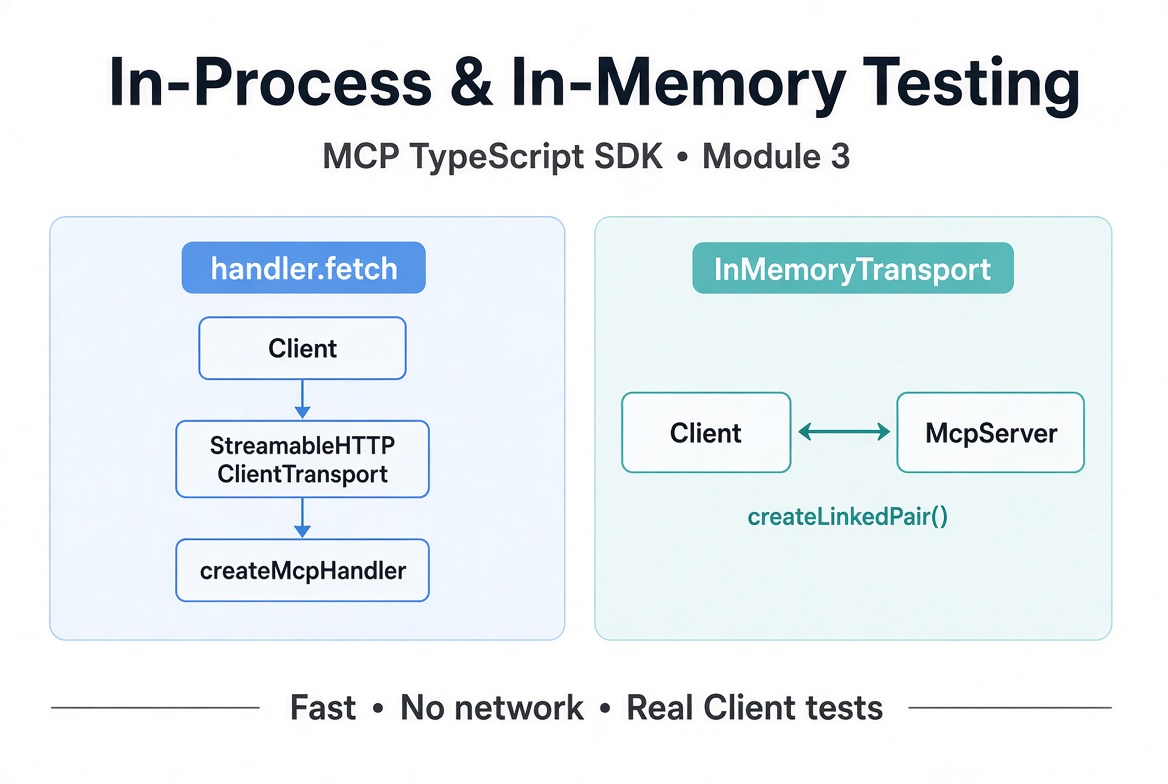
handler.fetch (recommended) — drive the exact createMcpHandler you deploy, in-process, over the modern 2026-07-28 path.
InMemoryTransport.createLinkedPair() — pair a Client and an McpServer instance directly in memory (primarily for 2025-era coverage).
Both keep tests in a single process, run in milliseconds, and let you assert on real callTool results, structuredContent, and isError flags.

Left: the deployable handler path (handler.fetch). Right: the pure in-memory pair.
Why These Patterns?
No sockets, no free ports, no race conditions on process startup.
You exercise the same code that production hosts will call.
Failures surface as ordinary results with isError: true (or protocol errors that reject), exactly as they do in production.
Easy teardown between tests.
Stdio still requires spawning a real process (StdioClientTransport). Reserve that for a smaller set of end-to-end checks; use the patterns below for the bulk of your suite.
Pattern 1: Serve the Handler In-Process (handler.fetch)
Start from the same factory you ship. Wrap it with createMcpHandler, then hand handler.fetch to a StreamableHTTPClientTransport as its fetch option. The transport never dials the dummy URL — every request is answered in-process by the handler.
import { Client, StreamableHTTPClientTransport } from '@modelcontextprotocol/client';
import { createMcpHandler, McpServer } from '@modelcontextprotocol/server';
import * as z from 'zod/v4';

function createServer() {
  const server = new McpServer({ name: 'pricing', version: '1.0.0' });

  server.registerTool(
    'apply-discount',
    {
      description: 'Apply a percentage discount to a price',
      inputSchema: z.object({
        price: z.number(),
        percent: z.number().min(0).max(100)
      }),
      outputSchema: z.object({ total: z.number() })
    },
    async ({ price, percent }) => {
      if (price < 0) {
        return {
          content: [{ type: 'text', text: 'price must be >= 0' }],
          isError: true
        };
      }
      const total = price * (1 - percent / 100);
      return {
        content: [{ type: 'text', text: `$${total.toFixed(2)}` }],
        structuredContent: { total }
      };
    }
  );

  return server;
}

const handler = createMcpHandler(createServer);

const transport = new StreamableHTTPClientTransport(new URL('http://test.local/mcp'), {
  fetch: (url, init) => handler.fetch(new Request(url, init))
});

const client = new Client(
  { name: 'test-harness', version: '1.0.0' },
  { versionNegotiation: { mode: 'auto' } }
);
await client.connect(transport);

const result = await client.callTool({
  name: 'apply-discount',
  arguments: { price: 80, percent: 25 }
});
// result.structuredContent === { total: 60 }
versionNegotiation: { mode: 'auto' } lets the client negotiate the newest protocol revision the handler serves.
Pattern 2: Pair Instances in Memory (InMemoryTransport)
InMemoryTransport.createLinkedPair() returns two transports that are each other’s wire. Connect one end to the server and the other to the client.
import { InMemoryTransport } from '@modelcontextprotocol/client';

const [clientTransport, serverTransport] = InMemoryTransport.createLinkedPair();

const memServer = createServer();
const memClient = new Client({ name: 'test-harness', version: '1.0.0' });

await memServer.connect(serverTransport);
await memClient.connect(clientTransport);

const result = await memClient.callTool({
  name: 'apply-discount',
  arguments: { price: 80, percent: 25 }
});
// same structuredContent as above
Note: createLinkedPair connects 2025-era instances only. For 2026-07-28 coverage use the handler.fetch pattern. See the protocol versions guide for the distinction.
Assertions and Error Handling
Assert on structuredContent for the happy path. Tool-level failures (invalid arguments, explicit isError: true, or ordinary exceptions inside the handler) resolve as ordinary results with isError: true — they do not throw.
import assert from 'node:assert/strict';

assert.deepStrictEqual(result.structuredContent, { total: 60 });

const failed = await client.callTool({
  name: 'apply-discount',
  arguments: { price: -5, percent: 25 }
});
assert.equal(failed.isError, true);
// failed.content[0].text === 'price must be >= 0'
Protocol-level problems (unknown tool name, capability mismatch, etc.) still reject the promise with a ProtocolError.
Teardown
Always close the client first, then the handler (or the server transport). This aborts any in-flight exchanges so they cannot leak into the next test.
await client.close();
await handler.close();
// or for the in-memory pair:
// await memClient.close();
// await memServer.close();
Complete Runnable Example
Save as in-process-test.ts and run with npx tsx in-process-test.ts (or wire into your test runner).
import assert from 'node:assert/strict';

import { Client, StreamableHTTPClientTransport, InMemoryTransport } from '@modelcontextprotocol/client';
import { createMcpHandler, McpServer } from '@modelcontextprotocol/server';
import * as z from 'zod/v4';

function createServer() {
  const server = new McpServer({ name: 'pricing', version: '1.0.0' });

  server.registerTool(
    'apply-discount',
    {
      description: 'Apply a percentage discount to a price',
      inputSchema: z.object({
        price: z.number(),
        percent: z.number().min(0).max(100)
      }),
      outputSchema: z.object({ total: z.number() })
    },
    async ({ price, percent }) => {
      if (price < 0) {
        return {
          content: [{ type: 'text', text: 'price must be >= 0' }],
          isError: true
        };
      }
      const total = price * (1 - percent / 100);
      return {
        content: [{ type: 'text', text: `$${total.toFixed(2)}` }],
        structuredContent: { total }
      };
    }
  );

  return server;
}

async function testHandlerFetch() {
  const handler = createMcpHandler(createServer);

  const transport = new StreamableHTTPClientTransport(new URL('http://test.local/mcp'), {
    fetch: (url, init) => handler.fetch(new Request(url, init))
  });

  const client = new Client(
    { name: 'test-harness', version: '1.0.0' },
    { versionNegotiation: { mode: 'auto' } }
  );

  try {
    await client.connect(transport);

    const result = await client.callTool({
      name: 'apply-discount',
      arguments: { price: 80, percent: 25 }
    });
    assert.deepStrictEqual(result.structuredContent, { total: 60 });
    assert.equal(result.isError, undefined); // or false

    const failed = await client.callTool({
      name: 'apply-discount',
      arguments: { price: -5, percent: 25 }
    });
    assert.equal(failed.isError, true);

    console.log('handler.fetch path: OK');
  } finally {
    await client.close();
    await handler.close();
  }
}

async function testInMemory() {
  const [clientTransport, serverTransport] = InMemoryTransport.createLinkedPair();

  const memServer = createServer();
  const memClient = new Client({ name: 'test-harness', version: '1.0.0' });

  try {
    await memServer.connect(serverTransport);
    await memClient.connect(clientTransport);

    const result = await memClient.callTool({
      name: 'apply-discount',
      arguments: { price: 80, percent: 25 }
    });
    assert.deepStrictEqual(result.structuredContent, { total: 60 });

    console.log('InMemoryTransport path: OK');
  } finally {
    await memClient.close();
    await memServer.close();
  }
}

async function main() {
  await testHandlerFetch();
  await testInMemory();
  console.log('All in-process / in-memory checks passed');
}

main().catch(err => {
  console.error(err);
  process.exit(1);
});
Best Practices
Prefer the handler.fetch pattern for any server you actually deploy over HTTP — it tests the real entry point and modern protocol path.
Use InMemoryTransport when you want the absolute simplest pairing or are explicitly covering 2025-era behavior.
Keep the server factory pure so the same function can be used for tests, stdio, and HTTP deployment.
Close client then handler/server in a finally or afterEach.
Assert on structuredContent when the tool declares an outputSchema; fall back to inspecting text content blocks otherwise.
For stdio coverage, spawn the real process with StdioClientTransport in a smaller set of integration tests.
Recap
Pass handler.fetch as the fetch option on StreamableHTTPClientTransport to test the deployable modern handler in-process.
InMemoryTransport.createLinkedPair() pairs a client and server instance directly in memory (2025-era).
Tool failures appear as results with isError: true; only protocol problems reject.
Always close the client first, then the handler or server, between tests.
These patterns give you fast, reliable coverage of the protocol surface without network or process overhead.
Official reference: Test a server
Get new posts by Nelson Lin
Subscribe to receive email notifications when a new article is published.