Testing with MCP Inspector
Module 1 — Your First Server
You now have a working McpServer with tools, Zod schemas, and proper isError: true handling. The fastest way to exercise it end-to-end — without wiring it into VS Code, Claude Code, or Cursor — is the MCP Inspector.
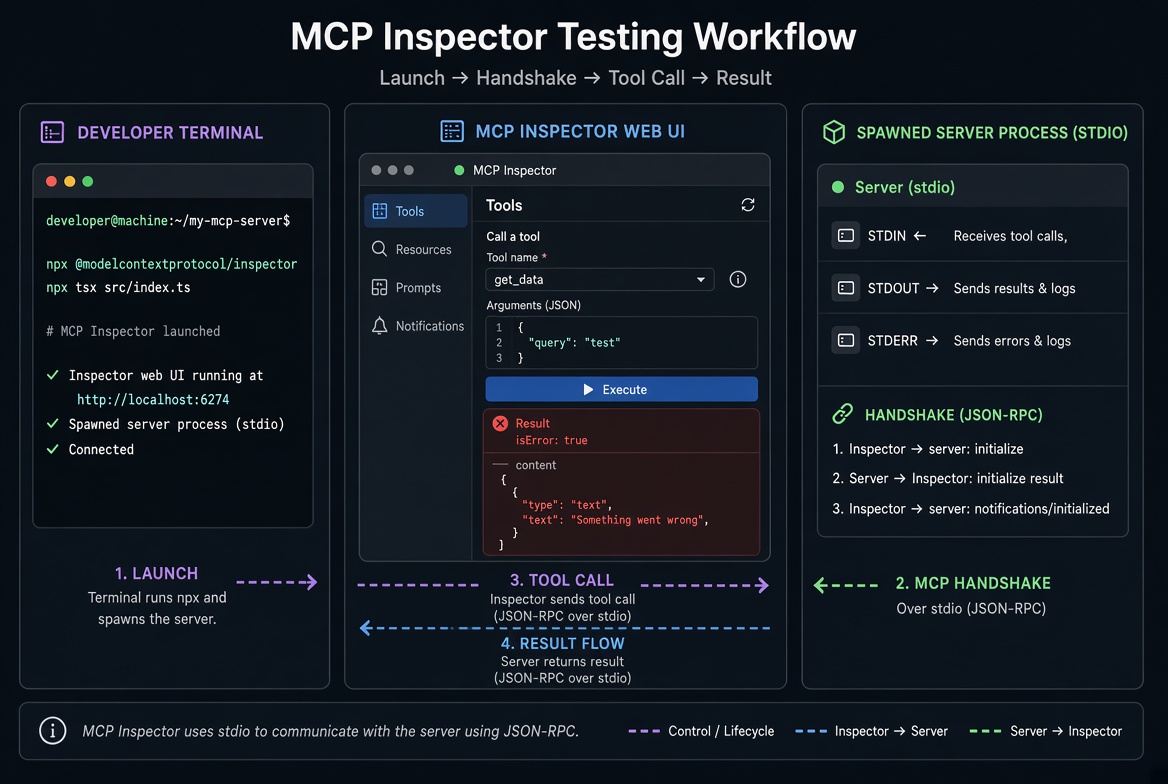
The Inspector is the official reference developer tool. It launches your server as a child process (or connects to a remote endpoint), performs the MCP handshake, lists tools/resources/prompts, and lets you call them with arbitrary arguments. You see the exact content blocks and isError flags a model would receive.

Inspector launches your npx tsx src/index.ts process, speaks MCP over stdio, and shows the same results a real host would deliver to the model.
Why Use the Inspector First?
No host configuration required.
Immediate feedback on schemas, descriptions, validation errors, and isError: true messages.
Raw JSON-RPC traffic visible (useful when something looks wrong).
Works for both stdio (local) and Streamable HTTP (remote) servers.
CLI mode (--cli) makes the same checks scriptable for CI or quick verification.
It requires Node.js 22.19 or later.
Launch Against Your Server
From the project root (the same directory that contains src/index.ts and package.json):
npx @modelcontextprotocol/inspector@latest npx tsx src/index.tsThe Inspector:
Starts a local web server.
Prints a URL that includes a one-time security token (open that exact URL — do not guess localhost:6274).
Spawns your server command (npx tsx src/index.ts) and connects over stdio.
Opens the browser automatically (disable with MCP_AUTO_OPEN_ENABLED=false).
In the browser:
Click Connect if it is not already connected.
Open the Tools tab.
Select a tool (e.g. search-products or get-product).
Fill in the form generated from your Zod inputSchema.
Click Run.
You will see:
The content blocks the model receives.
Whether isError is true.
The full request/response JSON in the monitoring pane.
Test the Happy Path and the Error Paths
With the catalog server from earlier articles, try:
Valid call: query: "mug" → success text with matching products.
Schema failure: limit: 999 (if your schema caps it) → isError: true with the Zod validation message. The handler never runs.
Explicit tool error: call get-product with a non-existent id → the exact recovery text you returned with isError: true.
This is the same shape a model sees, so fix messages and descriptions here before connecting a real host.
CLI Mode (Fast & Scriptable)
Add --cli for non-interactive checks:
# List tools
npx @modelcontextprotocol/inspector@latest --cli npx tsx src/index.ts --method tools/list

# Call a tool
npx @modelcontextprotocol/inspector@latest --cli npx tsx src/index.ts \
--method tools/call \
--tool-name get-product \
--tool-arg id=missing
Use --format json and pipe to jq for automation. The CLI supports the same transports and protocol eras as the web UI.
Protocol Eras
The Inspector can speak both the modern 2026-07-28 era and the older 2025-era protocol. By default it may prefer the legacy era for compatibility. Force the modern era when testing new servers:
npx @modelcontextprotocol/inspector@latest --cli \
  --protocol-era modern \
  npx tsx src/index.ts \
  --method tools/list
Your factory + serveStdio already supports both eras; the Inspector lets you verify each one.
Practical Tips
Log to stderr only. console.log writes to stdout and corrupts the JSON-RPC stream. Use console.error (or a proper logger that targets stderr).
Pass environment variables with -e KEY=value before the server command if your tools need secrets or config.
Restart cleanly. Stop the Inspector (Ctrl+C) and re-run the npx command after code changes. tsx picks up the new source on each launch.
Add a package.json script for convenience:
{
  "scripts": {
    "inspect": "npx @modelcontextprotocol/inspector@latest npx tsx src/index.ts"
  }
}
Then run npm run inspect.
What to Verify Before Connecting a Real Host
Tools appear with the names and descriptions you expect.
Argument forms match your Zod schemas (including .describe() text).
Valid calls return the expected content.
Invalid arguments produce clear isError: true validation messages.
Business-logic failures return helpful recovery text with isError: true.
No unexpected protocol errors for normal tool use.
Server starts and shuts down cleanly (no leftover processes).
Once these pass, the same server command (npx tsx src/index.ts) is what you will give to VS Code, Claude Code, and Cursor.
Recap
MCP Inspector is the official interactive (and CLI) tool for testing servers without a full host.
Launch with npx @modelcontextprotocol/inspector npx tsx src/index.ts.
Use it to exercise both success paths and isError: true paths (validation + explicit errors).
Prefer the modern protocol era when testing new code.
Keep stdout pure; log to stderr.
After Inspector validation, the identical launch command works in real hosts.
Official references:
Build your first server · MCP Inspector
Next: Connecting to real hosts (VS Code / Claude Code / Cursor).
Get new posts by Nelson Lin
Subscribe to receive email notifications when a new article is published.