Resources: Static Resources, URI Templates, Listing, and Reading
Module 2 — Core Server Features
Resources are application-controlled read-only data. Unlike tools (which the model decides to call), a host or user chooses which resources to read and attaches their contents as context for the model.
This article covers:
Registering static resources with fixed URIs
Returning text and binary (blob) contents
URI templates (ResourceTemplate) for parameterized families of resources
How listing works (resources/list vs resources/templates/list)
Reading concrete URIs
File-backed resources (safe path handling for docs/files on disk)
A complete, runnable catalog example you can drop into a server
All code uses the official TypeScript SDK v2 (@modelcontextprotocol/server) and the 2026-07-28 protocol era.

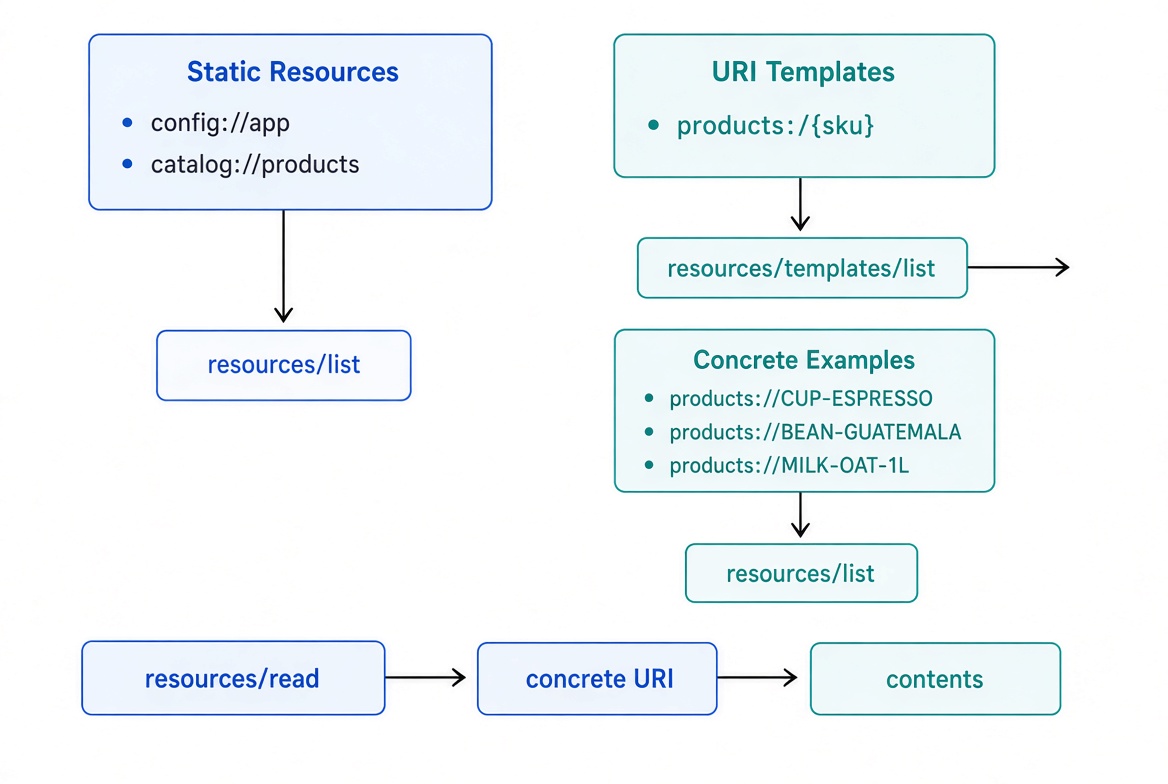
Static resources appear directly in resources/list. URI templates appear in resources/templates/list. A template’s optional list callback can also surface concrete instances in the main resource list.
Concept + Why It Matters
Aspect | Static resource | Resource template |
|---|---|---|
Registration | Fixed URI string |
|
Discovery | Appears in | Pattern appears in |
Concrete instances | One URI | Client expands the template (or server lists them) |
Read callback |
|
|
Best for | Config, status, a single report | Users, products, files, database rows |
Resources are ideal for data the model should see but not act on: configuration, documentation, database rows, generated reports, file contents, etc.
The host decides what to read. The model never “calls” a resource the way it calls a tool.
Register a Static Resource
registerResource takes a name, a fixed URI, metadata, and a read callback.
import { McpServer } from '@modelcontextprotocol/server';

const server = new McpServer({ name: 'catalog', version: '1.0.0' });

server.registerResource(
  'config',                       // internal name
  'config://app',                 // URI clients use
  {
    title: 'Application Config',
    description: 'Current catalog configuration',
    mimeType: 'text/plain'
  },
  async (uri) => ({
    contents: [{
      uri: uri.href,              // always echo the requested URI
      text: 'currency=USD\ntax_rate=0.08\nregion=us-west-2'
    }]
  })
);
After registration:
resources/list advertises the resource with its metadata.
resources/read on that exact URI runs the callback.
The name is mainly for your code and for some host UIs. Clients address the resource by its URI.
Returning Multiple Contents (Text + Binary)
A single read can return several content items. Use text for textual data and blob (base64) for binary data.
// Tiny 1×1 PNG (in production, read from disk or object storage)
const chartPng = 'iVBORw0KGgoAAAANSUhEUgAAAAEAAAABCAYAAAAfFcSJAAAAC0lEQVR4nGNgAAIAAAUAAXpeqz8AAAAASUVORK5CYII=';

server.registerResource(
  'weekly-report',
  'report://latest',
  {
    title: 'Latest Weekly Report',
    description: 'Summary + chart',
    mimeType: 'text/markdown'
  },
  async (uri) => ({
    contents: [
      {
        uri: uri.href,
        mimeType: 'text/markdown',
        text: '# Weekly Report\n\nActive products grew 12% this week.'
      },
      {
        uri: uri.href,
        mimeType: 'image/png',
        blob: chartPng
      }
    ]
  })
);
The mimeType on the registration describes the resource as a whole in the list. The mimeType on each content item describes that specific piece.
Resource Templates (URI Templates)
When you have many similar resources (one per user, product, file, etc.), register a URI template instead of one resource per item.
Templates follow RFC 6570. Placeholders are written as {variableName}.
import { McpServer, ResourceTemplate } from '@modelcontextprotocol/server';

server.registerResource(
  'product',
  new ResourceTemplate('products://{sku}/details', { list: undefined }),
  {
    title: 'Product Details',
    description: 'Full product record for one SKU',
    mimeType: 'application/json'
  },
  async (uri, { sku }) => {
    // sku is extracted and decoded for you
    const product = await getProductBySku(sku);
    if (!product) {
      // Prefer throwing a clear error (SDK turns it into a protocol error)
      throw new Error(`Product not found: ${sku}`);
    }

    return {
      contents: [{
        uri: uri.href,
        mimeType: 'application/json',
        text: JSON.stringify(product, null, 2)
      }]
    };
  }
);
Key points:
list: undefined is required even when you do not want to enumerate instances. It tells the SDK “this template is not enumerable.”
The second argument to the read callback receives the matched variables ({ sku: '...' }).
Clients discover the pattern via resources/templates/list, expand it themselves (or with completion), then call resources/read on the concrete URI.
Making Template Instances Appear in resources/list
If the set of instances is reasonably sized and you want them discoverable in the main resource list, supply a list callback:
const teams = [
  { id: 'core', name: 'Core Platform' },
  { id: 'growth', name: 'Growth' }
];

server.registerResource(
  'team-roster',
  new ResourceTemplate('teams://{teamId}/roster', {
    list: async () => ({
      resources: teams.map(t => ({
        uri: `teams://${t.id}/roster`,
        name: `${t.name} roster`,
        description: `Members of the ${t.name} team`
      }))
    })
  }),
  {
    description: 'Members of one team',
    mimeType: 'text/plain'
  },
  async (uri, { teamId }) => ({
    contents: [{
      uri: uri.href,
      text: `Members of team ${teamId}: ...`
    }]
  })
);
Now:
The concrete URIs appear in resources/list (merged with static resources).
The pattern still appears in resources/templates/list.
Listing vs Reading
Method | What it returns | When to use |
|---|---|---|
| Static resources + any instances enumerated by template | Host UI tree, “what can I attach?” |
| URI patterns (templates) | Client wants to build a concrete URI |
| Contents for one concrete URI | Fetch the actual data |
The high-level client helpers (listResources(), listResourceTemplates(), readResource()) walk pagination automatically.
File-backed Resources
A common and powerful pattern is to expose files from a directory as resources via a URI template. This is ideal for documentation, README files, markdown notes, or any content you already keep on disk.
Because the path comes from the client (via the template variable), you must sanitize it. Never pass a raw template variable to a filesystem API.
Safe pattern
import { readFile, realpath } from 'node:fs/promises';
import path from 'node:path';

const DOCS_ROOT = path.resolve('./docs');

server.registerResource(
  'doc',
  new ResourceTemplate('docs://{file}', { list: undefined }),
  {
    title: 'Documentation',
    description: 'A markdown file from the docs directory',
    mimeType: 'text/markdown'
  },
  async (uri, { file }) => {
    // Resolve the real path (collapses .. and follows symlinks)
    const requested = await realpath(path.join(DOCS_ROOT, String(file)));

    // Reject anything that escaped the root
    if (!requested.startsWith(DOCS_ROOT + path.sep)) {
      throw new Error(`${uri.href} resolves outside the docs root`);
    }

    return {
      contents: [{
        uri: uri.href,
        mimeType: 'text/markdown',
        text: await readFile(requested, 'utf8')
      }]
    };
  }
);
Key safety rules:
Always resolve with realpath (or equivalent) so .. and symlinks are collapsed.
Compare the resolved path against a known root directory.
Throw a clear error on rejection — the SDK turns it into a proper protocol error.
Prefer list: undefined unless the directory is small and you want to enumerate every file.
This pattern appears in the complete example below.
Complete Catalog Example
Here is a self-contained factory you can use with serveStdio or any HTTP adapter. It includes static resources, a templated product resource, and a file-backed docs resource.
import { McpServer, ResourceTemplate } from "@modelcontextprotocol/server";
import { serveStdio } from "@modelcontextprotocol/server/stdio";
import { readdir, readFile, realpath } from "node:fs/promises";
import path from "node:path";

interface Product {
  sku: string;
  name: string;
  price: number;
  category: string;
  description: string;
}

const PRODUCTS: Product[] = [
  {
    sku: "CUP-ESPRESSO",
    name: "Espresso cup",
    price: 12,
    category: "drinkware",
    description: "Ceramic 60ml espresso cup",
  },
  {
    sku: "MUG-TRAVEL",
    name: "Travel mug",
    price: 24,
    category: "drinkware",
    description: "Insulated stainless travel mug",
  },
  {
    sku: "RACK-MUG",
    name: "Mug rack",
    price: 36,
    category: "storage",
    description: "Wooden mug rack, holds 6",
  },
];

const DOCS_ROOT = path.resolve("./docs");

function createServer(): McpServer {
  const server = new McpServer({ name: "catalog", version: "1.0.0" });

  // 1. Static configuration resource
  server.registerResource(
    "config",
    "config://app",
    {
      title: "Catalog Config",
      description: "Current catalog settings",
      mimeType: "text/plain",
    },
    async (uri) => ({
      contents: [
        {
          uri: uri.href,
          text: "currency=USD\ntax_rate=0.08\nregion=us-west-2\nversion=1.2.0",
        },
      ],
    }),
  );

  // 2. Static summary of all products
  server.registerResource(
    "product-index",
    "catalog://products",
    {
      title: "Product Index",
      description: "All products (SKU + name + price)",
      mimeType: "application/json",
    },
    async (uri) => ({
      contents: [
        {
          uri: uri.href,
          mimeType: "application/json",
          text: JSON.stringify(
            PRODUCTS.map((p) => ({ sku: p.sku, name: p.name, price: p.price })),
            null,
            2,
          ),
        },
      ],
    }),
  );

  // 3. Templated product detail (enumerable so it shows in resources/list)
  server.registerResource(
    "product",
    new ResourceTemplate("products://{sku}", {
      list: async () => ({
        resources: PRODUCTS.map((p) => ({
          uri: `products://${p.sku}`,
          name: p.name,
          description: p.description,
          mimeType: "application/json",
        })),
      }),
    }),
    {
      title: "Product Details",
      description: "Full product record by SKU",
      mimeType: "application/json",
    },
    async (uri, { sku }) => {
      const product = PRODUCTS.find((p) => p.sku === sku);
      if (!product) {
        throw new Error(`Product not found: ${sku}`);
      }
      return {
        contents: [
          {
            uri: uri.href,
            mimeType: "application/json",
            text: JSON.stringify(product, null, 2),
          },
        ],
      };
    },
  );

  // 4. File-backed documentation resource (safe path handling)
  server.registerResource(
    "doc",
    new ResourceTemplate("docs://{file}", {
      list: async () => {
        const entries = await readdir(DOCS_ROOT, { withFileTypes: true });
        return {
          resources: entries
            .filter((entry) => entry.isFile() && entry.name.endsWith(".md"))
            .map((entry) => ({
              uri: `docs://${entry.name}`,
              name: entry.name,
              mimeType: "text/markdown",
            })),
        };
      },
    }),
    {
      title: "Documentation",
      description: "A markdown file from the docs directory",
      mimeType: "text/markdown",
    },
    async (uri, { file }) => {
      const requested = await realpath(path.join(DOCS_ROOT, String(file)));
      if (!requested.startsWith(DOCS_ROOT + path.sep)) {
        throw new Error(`${uri.href} resolves outside the docs root`);
      }
      return {
        contents: [
          {
            uri: uri.href,
            mimeType: "text/markdown",
            text: await readFile(requested, "utf8"),
          },
        ],
      };
    },
  );

  return server;
}

const handle = serveStdio(createServer);

process.on("SIGINT", () => {
  void handle.close();
});

console.error("Catalog MCP server running on stdio");
What a client sees
resources/list returns something like:
config://app
catalog://products
products://CUP-ESPRESSO
products://MUG-TRAVEL
products://RACK-MUG
resources/templates/list returns:
products://{sku} (name: product)
docs://{file} (name: doc)
resources/read on products://MUG-TRAVEL returns the full product JSON.resources/read on docs://readme.md returns the contents of ./docs/readme.md (if it exists and stays inside the root).
Testing
Run the server with serveStdio (or an HTTP adapter).
Use the MCP Inspector, VS Code MCP extension, Claude Code, or Cursor.
Call resources/list and resources/templates/list.
Read both static URIs and expanded template URIs.
The SDK automatically sends notifications/resources/list_changed when you register, enable, disable, or remove a resource.
Recap
registerResource(name, uri, metadata, readCallback) registers a fixed resource.
The read callback returns { contents: [...] }. Each item echoes uri and carries either text or a base64 blob.
new ResourceTemplate(pattern, { list }) registers a URI pattern. Matched variables arrive as the second argument of the read callback.
list: undefined means “do not enumerate.” A list callback makes concrete instances appear in resources/list.
Clients discover patterns via resources/templates/list and read concrete URIs via resources/read.
For file-backed resources, always resolve with realpath and reject paths that escape the root directory.
Always validate and realpath-check any client-controlled filesystem path.
Next up in Module 2: Prompts (registerPrompt, argument schemas, and message templates).
Official references
Get new posts by Nelson Lin
Subscribe to receive email notifications when a new article is published.