Integrating with an LLM Tool-Calling Loop (Simple Host Example with LangChain Deep Agents)
Module 3 — Building Clients
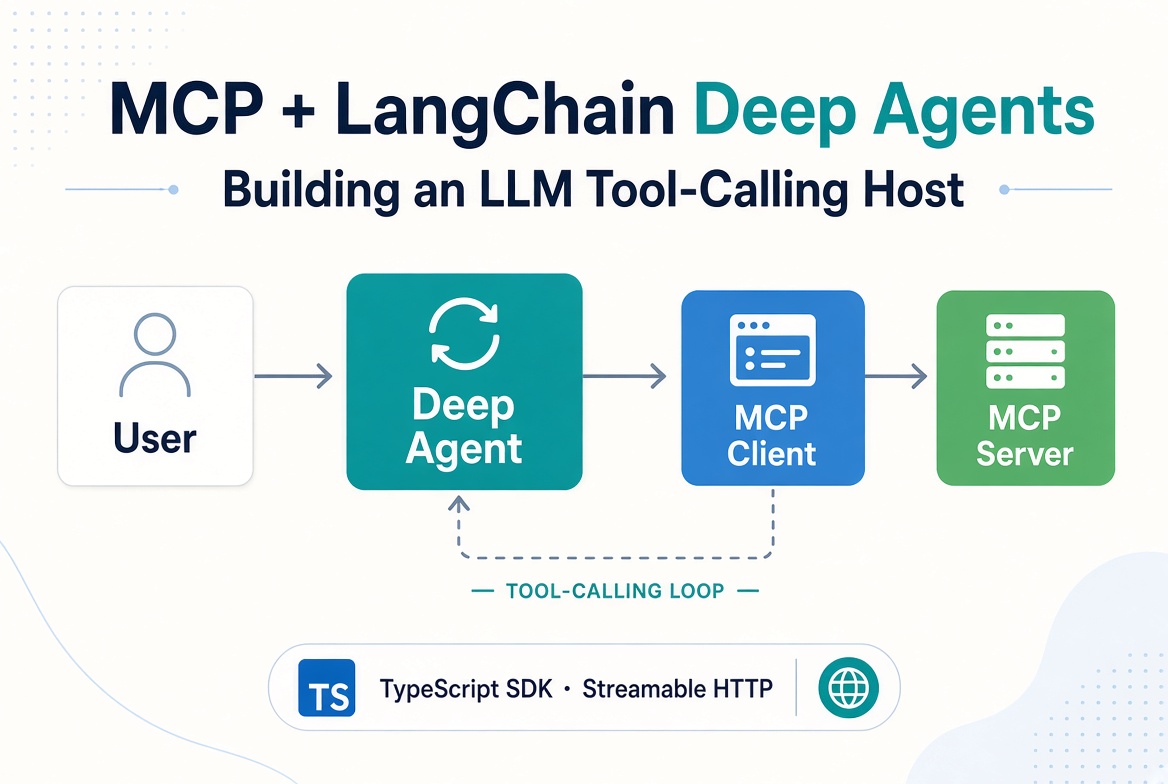
A client can list tools and call them, but a host is what turns those capabilities into an autonomous agent. The host owns the LLM, feeds it the tool catalog, and runs the classic tool-calling loop:
Send the user’s message + available tools to the model.
If the model returns a tool call, invoke it via the MCP Client.
Append the tool result and continue until the model produces a final answer.
This article shows how to build a simple host that uses the official @modelcontextprotocol/client you already know, then hands the discovered tools to LangChain Deep Agents so the framework runs the loop for you.

The host (Deep Agent) drives the loop. The official MCP Client is the bridge that turns model tool calls into real MCP callTool invocations.
Integrating with an LLM Tool-Calling Loop (Simple Host Example with LangChain Deep Agents)
Why a Host Needs a Loop
MCP itself is only the protocol. The model decides which tool to call and with what arguments. The host must:
Convert the server’s listTools() result into the tool-calling format the model expects.
Execute the call with client.callTool({ name, arguments }).
Return the result (preferring structuredContent when present, falling back to text content blocks) so the model can observe and continue.
You can write this loop by hand with any LLM SDK. Higher-level agent frameworks such as LangChain Deep Agents encapsulate the loop, planning, memory, and subagents while still letting you supply MCP tools.
Prerequisites
npm install @modelcontextprotocol/client @modelcontextprotocol/server @modelcontextprotocol/node @langchain/mcp-adapters deepagents @langchain/core @langchain/langgraph @langchain/openaiSet the API key in the environment:
export LLM_GATEWAY_API_KEY=your-key-hereThe example uses an OpenAI Chat Completions–compatible endpoint at https://api.llm-gateway.io/openai/v1. Any model available through that gateway that supports tool calling will work.
Deep Agents is an opinionated agent harness built on LangGraph. It already implements a reliable tool-calling loop plus planning, filesystem tools, and subagent support. We only need to give it the MCP tools.
Bridging the Official Client to LangChain Tools
@langchain/mcp-adapters provides loadMcpTools. It takes an already-connected MCP Client (the same one from the previous articles) and returns LangChain-compatible tools. You keep full control of the connection lifecycle.
import { loadMcpTools } from '@langchain/mcp-adapters';

// client is already connected (see previous Module 3 articles)
const tools = await loadMcpTools('catalog', client);
Each returned tool’s invoke method ultimately calls client.callTool.
Complete Runnable Example
1. Simple MCP Server (Streamable HTTP)
Save as server.ts:
import { createServer } from 'node:http';
import { McpServer } from '@modelcontextprotocol/server';
import { createMcpHandler } from '@modelcontextprotocol/server';
import {
  toNodeHandler,
  localhostHostValidation,
  localhostOriginValidation
} from '@modelcontextprotocol/node';
import { z } from 'zod';

function createServerFactory() {
  const server = new McpServer({ name: 'catalog-server', version: '1.0.0' });

  server.registerTool(
    'lookup-item',
    {
      title: 'Look up catalog item',
      description: 'Return price and stock for a product id',
      inputSchema: z.object({
        id: z.string().describe('Product id, e.g. SKU-42')
      }),
      outputSchema: z.object({
        id: z.string(),
        name: z.string(),
        price: z.number(),
        inStock: z.boolean()
      })
    },
    async ({ id }) => {
      // demo data
      const items: Record<string, { name: string; price: number; inStock: boolean }> = {
        'SKU-42': { name: 'Wireless Keyboard', price: 79.99, inStock: true },
        'SKU-7': { name: 'USB-C Hub', price: 34.5, inStock: false }
      };
      const item = items[id];
      if (!item) {
        return {
          isError: true,
          content: [{ type: 'text', text: `Unknown product ${id}` }]
        };
      }
      return {
        content: [{ type: 'text', text: JSON.stringify({ id, ...item }) }],
        structuredContent: { id, ...item }
      };
    }
  );

  return server;
}

const handler = createMcpHandler(createServerFactory);
const nodeHandler = toNodeHandler(handler);

const validateHost = localhostHostValidation();
const validateOrigin = localhostOriginValidation();

createServer((req, res) => {
  if (!validateHost(req, res) || !validateOrigin(req, res)) return;
  void nodeHandler(req, res);
}).listen(3000, '127.0.0.1', () => {
  console.log('MCP server listening on http://127.0.0.1:3000/mcp');
});
2. Host with Deep Agents
Save as host.ts:
import { Client } from '@modelcontextprotocol/client';
import { StreamableHTTPClientTransport } from '@modelcontextprotocol/client';
import { loadMcpTools } from '@langchain/mcp-adapters';
import { createDeepAgent } from 'deepagents';
import { ChatOpenAI } from '@langchain/openai';

async function main() {
  const client = new Client({ name: 'deep-agent-host', version: '1.0.0' });

  const transport = new StreamableHTTPClientTransport(
    new URL('http://localhost:3000/mcp')
  );

  await client.connect(transport);

  try {
    // Convert MCP tools into LangChain tools
    const tools = await loadMcpTools('catalog', client);
    console.log('Loaded tools:', tools.map(t => t.name));

    const model = new ChatOpenAI({
      model: 'gpt-4o', // or any tool-calling model available on the gateway
      configuration: {
        baseURL: 'https://api.llm-gateway.io/openai/v1',
        apiKey: process.env.LLM_GATEWAY_API_KEY
      }
    });

    const agent = await createDeepAgent({
      model,
      tools,
      systemPrompt: 'You are a helpful catalog assistant. Always use the lookup-item tool when the user asks about a product.'
    });

    const result = await agent.invoke({
      messages: [
        {
          role: 'user',
          content: 'What is the price and stock status of SKU-42?'
        }
      ]
    });

    const last = result.messages.at(-1);
    console.log('\\nFinal answer:');
    console.log(last?.content ?? last);
  } finally {
    await transport.terminateSession().catch(() => {});
    await client.close();
  }
}

main().catch(console.error);
Run it (start the HTTP server first, then the host):
# Terminal 1 — start the MCP server over Streamable HTTP
npx tsx ./src/server.ts

# Terminal 2 — run the host (with the gateway key set)
export LLM_GATEWAY_API_KEY=your-key-here
npx tsx src/host.ts
The agent will call lookup-item, receive the structured result, and answer with the price and stock status.
What Happens Under the Hood
StreamableHTTPClientTransport connects to the running HTTP server at http://localhost:3000/mcp and the Client completes the initialize handshake.
loadMcpTools calls client.listTools() and wraps each tool so that LangChain’s tool executor ends up calling client.callTool.
Deep Agents runs its tool-calling loop (powered by LangGraph):
Model sees the tools.
Model emits a tool call.
Adapter executes it via the MCP Client.
Result is returned as a ToolMessage.
Loop continues until the model produces a final message.
transport.terminateSession() + client.close() cleanly ends the session.
You can inspect the full message history in result.messages to see every tool call and observation.
Manual Loop (for Understanding)
If you want to see the loop without a framework, the pattern from the official first-client guide is:
// after listTools()
const messages = [{ role: 'user', content: userQuery }];

while (true) {
  const response = await llm.chat({ messages, tools: toolDefinitions });
  messages.push(response.message);

  if (!response.toolCalls?.length) break; // final answer

  for (const call of response.toolCalls) {
    const result = await client.callTool({
      name: call.name,
      arguments: call.arguments
    });
    messages.push({
      role: 'tool',
      tool_call_id: call.id,
      content: result.content // or structuredContent
    });
  }
}
Deep Agents (and similar frameworks) do exactly this, plus planning, retries, and context management.
Common Pitfalls
Forgetting to keep the Client alive — loadMcpTools holds a reference to your Client. Close it only after the agent has finished.
Tool name collisions — when connecting to multiple servers, consider the adapter’s prefix options so tool names stay unique.
isError vs thrown errors — the adapter turns MCP isError: true results into LangChain tool exceptions so the model can recover. Protocol errors still reject.
Model that does not support tools — Deep Agents requires a tool-calling model.
Server not running — the host expects the Streamable HTTP server to already be listening at http://localhost:3000/mcp. Start the server first.
What’s Next
You now have a complete host that discovers tools with the official Client and lets a modern agent framework drive the loop. The next article covers in-process and in-memory testing patterns so you can unit-test this host without spawning real processes.
References
Official first client guide: https://ts.sdk.modelcontextprotocol.io/v2/get-started/first-client.html
LangChain Deep Agents: https://docs.langchain.com/oss/javascript/deepagents
@langchain/mcp-adapters: https://docs.langchain.com/oss/javascript/langchain/mcp
Official examples/cli-client in the TypeScript SDK repo (full-featured reference host)
Get new posts by Nelson Lin
Subscribe to receive email notifications when a new article is published.