Error Handling Basics (`isError: true`)
Module 1 — Your First Server
Tools fail. A product is missing, an upstream API returns 500, a business rule is violated, or the model sends arguments that fail the Zod schema. MCP treats these as tool errors, not protocol failures.
A tool error is a normal JSON-RPC result with isError: true. The host delivers the content to the model so it can read the message and recover (retry with a different id, ask the user, pick another path). Protocol errors (JSON-RPC error objects) are invisible to the model; they are for the host application.
This is the distinction that lets models self-correct.

A successful JSON-RPC result carrying isError: true reaches the model. A protocol error never does.
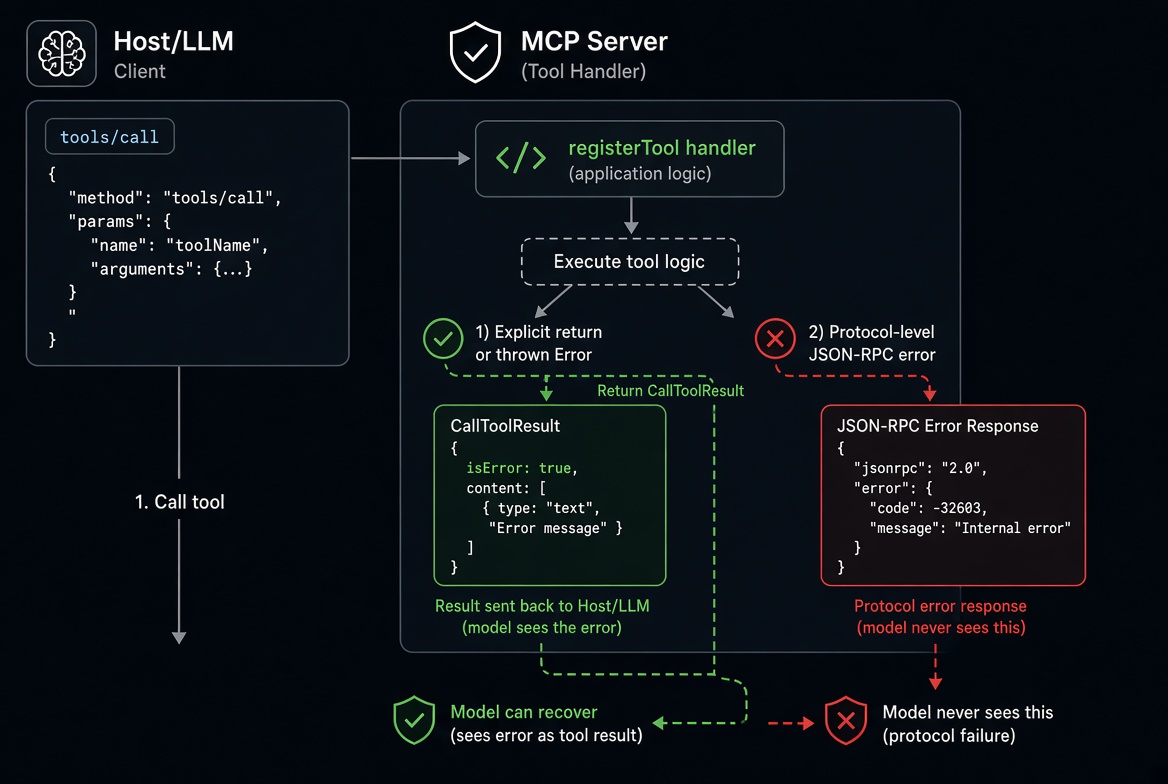
Why This Matters
The MCP specification is explicit:
Any errors that originate from the tool SHOULD be reported inside the result object, with isError set to true, not as an MCP protocol-level error response. Otherwise, the LLM would not be able to see that an error occurred and self-correct.In the TypeScript SDK v2:
Returning { content, isError: true } produces a tool error.
Throwing any exception from a tool handler also produces a tool error (the exception’s message becomes the text).
Arguments that fail inputSchema never reach your handler; they become an isError: true result with a validation message.
The SDK skips outputSchema validation on any result that has isError: true.
Unknown tools and other request-shape problems remain protocol errors (-32602 Invalid params). Your tool handlers cannot emit protocol errors (except the special UrlElicitationRequiredError used for elicitation).
Explicit isError: true
Use this when you know the failure and want to control the exact message the model sees. Include a recovery hint.
import { McpServer } from '@modelcontextprotocol/server';
import * as z from 'zod/v4';

const catalog = [
  { id: 'cup-01', name: 'Espresso cup', price: 12 },
  { id: 'mug-01', name: 'Travel mug', price: 24 }
];

function createServer(): McpServer {
  const server = new McpServer({ name: 'catalog-server', version: '1.0.0' });

  server.registerTool(
    'get-product',
    {
      description: 'Look up one product by its exact id',
      inputSchema: z.object({
        id: z.string().describe('Product id, e.g. cup-01')
      })
    },
    async ({ id }) => {
      const product = catalog.find(p => p.id === id);
      if (!product) {
        const known = catalog.map(p => p.id).join(', ');
        return {
          content: [{
            type: 'text',
            text: `No product with id "${id}". Known ids: ${known}`
          }],
          isError: true
        };
      }
      return {
        content: [{
          type: 'text',
          text: `${product.name} — $${product.price}`
        }]
      };
    }
  );

  return server;
}
Calling with { id: "missing" } returns:
{
  "content": [
    {
      "type": "text",
      "text": "No product with id \"missing\". Known ids: cup-01, mug-01"
    }
  ],
  "isError": true
}
The model sees the known ids and can retry correctly.
Thrown Exceptions Become Tool Errors
You can also throw. The SDK catches the exception and converts it to the same shape:
server.registerTool(
  'delete-product',
  {
    description: 'Remove a product by id',
    inputSchema: z.object({ id: z.string() })
  },
  async ({ id }) => {
    const index = catalog.findIndex(p => p.id === id);
    if (index === -1) {
      throw new Error(`Cannot delete "${id}": no such product`);
    }
    catalog.splice(index, 1);
    return { content: [{ type: 'text', text: `Deleted ${id}` }] };
  }
);
The result is identical in shape:
{
  "content": [{ "type": "text", "text": "Cannot delete \"missing\": no such product" }],
  "isError": true
}
Prefer returning isError: true for expected failures so you control the message. Let unexpected exceptions throw (they still become tool errors). Never put secrets, stack traces, or internal paths in thrown messages—the model sees them.
Input Validation Is Also a Tool Error
Zod validation failures never reach your handler. The SDK turns them into tool errors automatically:
// inputSchema has .max(20) on limit
await client.callTool({
  name: 'search-products',
  arguments: { query: 'mug', limit: 999 }
});
Result:
{
  "content": [{
    "type": "text",
    "text": "Input validation error: Invalid arguments for tool search-products: limit: Too big: expected number to be <=20"
  }],
  "isError": true
}
The model reads the constraint and retries with a valid value. This is why you should write clear .describe() text and reasonable constraints in your schemas.
Practical Guidelines
Put the recovery hint in the text. The model only sees content. “No product with id X. Known ids: …” is far more useful than “Not found”.
Use isError: true for anything the model can act on (missing data, validation, transient upstream errors, business-rule violations).
Return explicitly when you want a clean message; throw for unexpected cases.
Do not return structuredContent on error results if you also declare an outputSchema—the SDK skips validation, but hosts may still try to interpret it.
Log details to stderr (or a real logger) for your own debugging. The model should only receive the safe, actionable text.
Minimal Complete Example
import { McpServer } from '@modelcontextprotocol/server';
import { serveStdio } from '@modelcontextprotocol/server/stdio';
import * as z from 'zod/v4';

const notes = new Map([['welcome', 'Read the tools guide first.']]);

function createServer(): McpServer {
  const server = new McpServer({ name: 'notes', version: '1.0.0' });

  server.registerTool(
    'read-note',
    {
      description: 'Read a note by its id',
      inputSchema: z.object({
        id: z.string().describe('Note id')
      })
    },
    async ({ id }) => {
      const note = notes.get(id);
      if (!note) {
        return {
          content: [{
            type: 'text',
            text: `No note with id "${id}". Known ids: ${[...notes.keys()].join(', ')}`
          }],
          isError: true
        };
      }
      return { content: [{ type: 'text', text: note }] };
    }
  );

  return server;
}

const handle = serveStdio(createServer);

process.on('SIGINT', () => {
  void handle.close();
});

console.error('notes MCP server running on stdio');
Test with MCP Inspector or an in-process client. Call with a missing id and observe the isError: true result. Call with "welcome" and observe the success path.
Recap
Tool errors = successful JSON-RPC results with isError: true + content the model can read and act on.
Explicit return and thrown exceptions both produce this shape; prefer the former for expected cases.
Schema validation failures are also tool errors (handler never runs).
Protocol errors are for the host, not the model. Tool handlers cannot emit them.
Always include a recovery hint in the text.
Next: Testing with MCP Inspector.
Get new posts by Nelson Lin
Subscribe to receive email notifications when a new article is published.