@modelcontextprotocol/client + Transports (StdioClientTransport, Streamable HTTP)
Module 3 — Building Clients
A client is the other half of MCP. While servers expose tools, resources, and prompts, a client connects to a server, discovers what it offers, and invokes those capabilities. The official TypeScript SDK ships the client as a separate package: @modelcontextprotocol/client.
This article introduces the Client class and the two primary transports you will use:
StdioClientTransport — spawns a local server process and speaks JSON-RPC over its stdin/stdout.
StreamableHTTPClientTransport — connects to a remote server over HTTP (the modern Streamable HTTP transport).

The same Client class works with either transport. Stdio owns a child process; Streamable HTTP talks to a remote endpoint.
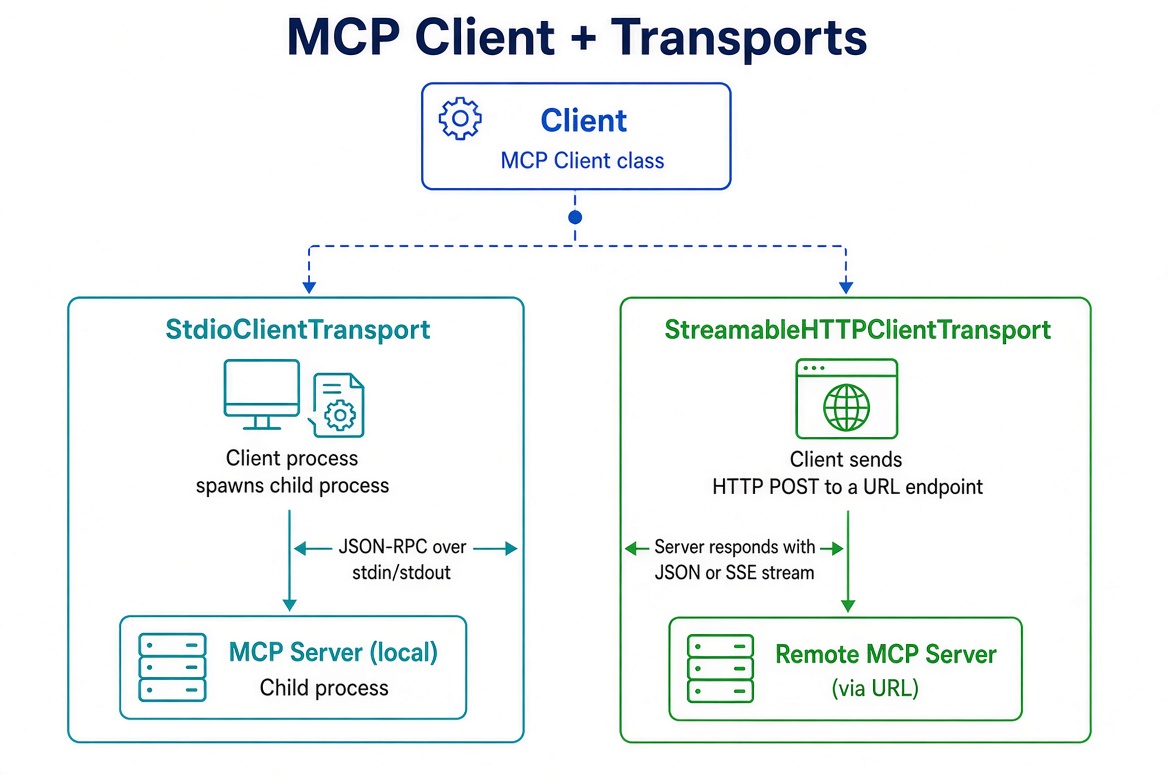
Typescript MCP Client and Transports
Install the Client Package
npm install @modelcontextprotocol/clientThe package is independent of @modelcontextprotocol/server. You only need it when you are writing client code (or a host).
The Client Class
import { Client } from '@modelcontextprotocol/client';

const client = new Client({
  name: 'my-client',
  version: '1.0.0'
});
Client takes an implementation info object (name + version). You can optionally pass a second argument with client capabilities and other options (version negotiation, list pagination limits, etc.), but the defaults are fine for most uses.
A Client instance holds one connection to one server. To talk to multiple servers you create multiple clients.
Transport 1: StdioClientTransport (Local Processes)
Use StdioClientTransport when the server runs as a child process of your client — the model used by desktop hosts (VS Code, Claude Code, Cursor, MCP Inspector, etc.).
Import it from the /stdio subpath:
import { Client } from '@modelcontextprotocol/client';
import { StdioClientTransport } from '@modelcontextprotocol/client/stdio';

const client = new Client({ name: 'catalog-client', version: '1.0.0' });

const transport = new StdioClientTransport({
  command: 'node',
  args: ['dist/server.js'],
  // optional:
  // cwd: '/path/to/server',
  // env: { API_KEY: '...' },
  // stderr: 'pipe'   // capture stderr instead of inheriting
});

await client.connect(transport);
What happens:
connect() calls transport.start(), which spawns the child process.
The client and server exchange the initialize handshake over stdin/stdout.
The client now owns the process. It lives exactly as long as the transport.
Important rules:
Never start the server process yourself. connect() does it.
A spawn ENOENT error means command is not on your PATH.
client.close() (or transport.close()) shuts the child down cleanly: close stdin → SIGTERM → SIGKILL if needed.
The transport is Node.js only.
After connecting you can read what the server declared:
console.log(client.getServerVersion());       // { name, version }
console.log(client.getServerCapabilities());  // { tools: {...}, resources: {...}, ... }
console.log(client.getInstructions());        // optional usage guide for the model
Transport 2: StreamableHTTPClientTransport (Remote Servers)
Use StreamableHTTPClientTransport for servers that run independently and expose an HTTP endpoint (the recommended remote transport).
import { Client, StreamableHTTPClientTransport } from '@modelcontextprotocol/client';

const client = new Client({ name: 'remote-client', version: '1.0.0' });

const transport = new StreamableHTTPClientTransport(
  new URL('http://localhost:3000/mcp')
);

await client.connect(transport);
connect() performs the same initialize handshake, this time over HTTP. The transport sends JSON-RPC messages as HTTP POSTs. The server may respond with a normal JSON body or an SSE stream for that request.
Key differences from stdio:
The server is an independent process (or service). Your client does not own its lifecycle.
Multiple clients can connect to the same server at the same time.
Session management is handled via the Mcp-Session-Id header when the server uses sessions.
Call transport.terminateSession() (when appropriate) before client.close() to cleanly end a session.
// Clean shutdown for a session-based HTTP server
await transport.terminateSession();
await client.close();
On transports without sessions, close() alone is sufficient.
Choosing the Right Transport
Concern | StdioClientTransport | StreamableHTTPClientTransport |
|---|---|---|
Where the server runs | Local child process | Remote HTTP endpoint |
Who owns the process | Your client | The server operator |
Typical use | Desktop hosts, local tools, testing | Shared/remote services, production APIs |
Session termination | Automatic on close | Explicit |
Environment | Node.js only | Any environment that can do HTTP |
There is also a legacy SSEClientTransport for older servers that only support the deprecated HTTP+SSE transport. Prefer Streamable HTTP; fall back to SSE only when necessary.
Complete Runnable Example
The following is a complete, self-contained client that:
Connects over stdio to a simple server (the notes-style server from Module 1 works perfectly).
Prints server metadata.
Lists tools.
Calls a tool.
Always closes cleanly (even if something throws).
Companion server (src/server.ts)
If you do not already have a server, save this minimal one:
// src/server.ts
import { McpServer } from '@modelcontextprotocol/server';
import { serveStdio } from '@modelcontextprotocol/server/stdio';
import * as z from 'zod/v4';

function createServer() {
  const server = new McpServer({ name: 'demo-server', version: '1.0.0' });

  server.registerTool(
    'echo',
    {
      description: 'Echoes the provided message',
      inputSchema: z.object({ message: z.string() })
    },
    async ({ message }) => ({
      content: [{ type: 'text', text: `Echo: ${message}` }]
    })
  );

  return server;
}

serveStdio(createServer);
Complete client (src/client.ts)
import { Client } from '@modelcontextprotocol/client';
import { StdioClientTransport } from '@modelcontextprotocol/client/stdio';

async function main() {
  const client = new Client({ name: 'demo-client', version: '1.0.0' });

  const transport = new StdioClientTransport({
    command: 'npx',
    args: ['tsx', 'src/server.ts']
  });

  try {
    await client.connect(transport);

    console.log('Connected to:', client.getServerVersion());
    console.log('Capabilities:', client.getServerCapabilities());

    // List tools
    const { tools } = await client.listTools();
    console.log('\nTools:');
    for (const tool of tools) {
      console.log(`- ${tool.name}: ${tool.description ?? '(no description)'}`);
    }

    // Call a tool
    const result = await client.callTool({
      name: 'echo',
      arguments: { message: 'Hello from the client!' }
    });

    console.log('\nTool result:');
    for (const block of result.content) {
      if (block.type === 'text') console.log(block.text);
    }
  } finally {
    // Always close — this terminates the child process cleanly
    await client.close();
  }
}

main().catch(console.error);
Run it with:
npx tsx src/client.tsYou should see the server version, the echo tool, and the echoed message. The process exits on its own because of the finally block.
Remote Streamable HTTP variant
The same client logic works with Streamable HTTP — only the transport construction and shutdown change:
import { Client, StreamableHTTPClientTransport } from '@modelcontextprotocol/client';

async function main() {
  const client = new Client({ name: 'remote-demo', version: '1.0.0' });

  const transport = new StreamableHTTPClientTransport(
    new URL('http://localhost:3000/mcp')
  );

  try {
    await client.connect(transport);

    console.log('Connected to:', client.getServerVersion());

    const { tools } = await client.listTools();
    console.log('Tools:', tools.map(t => t.name));

    const result = await client.callTool({
      name: 'echo',
      arguments: { message: 'Hello over HTTP' }
    });

    console.log(result.content);
  } finally {
    // terminateSession is safe even if the server is stateless
    await transport.terminateSession().catch(() => {});
    await client.close();
  }
}

main().catch(console.error);
Common Pitfalls
Starting the server yourself with stdio — The client must be the one that spawns it. If you start the process externally, the stdio pipes will not be wired correctly.
Forgetting to close — Especially with stdio, an unclosed client leaves a child process running. Always use try/finally (or an equivalent pattern).
Mixing transports — A Client is bound to the transport you passed to connect(). To switch transports you create a new client.
Assuming session termination is always needed — terminateSession() is a no-op (or returns early) when the server never issued a session ID. It is safe to call.
What’s Next
You now know how to construct a Client and connect it over either of the main transports, and you have a complete working example that lists tools and calls one. The next article covers the operations you perform after connecting in more depth: listing tools/resources/prompts, calling tools, reading resources, and handling the results (including structured content, errors, and pagination).
Official references:
@modelcontextprotocol/client API
Get new posts by Nelson Lin
Subscribe to receive email notifications when a new article is published.