SDK Overview: Packages, Standard Schema, Factory Pattern, and Transports
Module 0 — Foundations
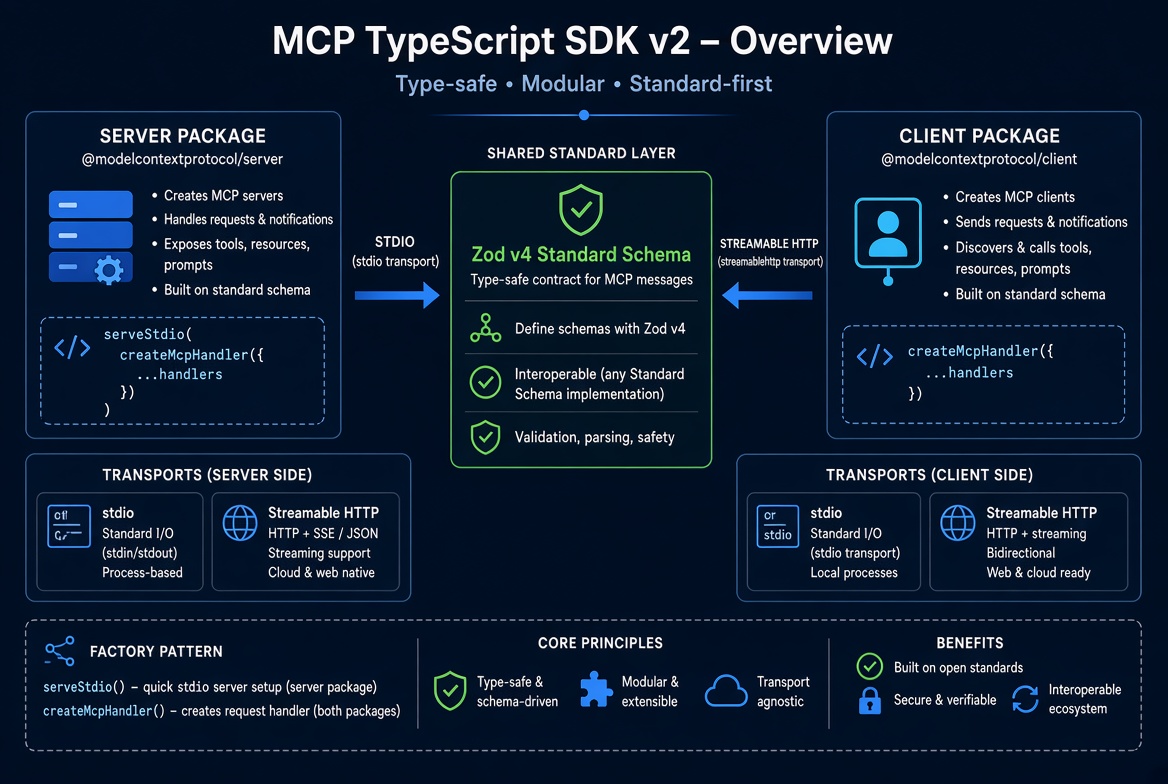
The official TypeScript SDK v2 is the implementation you will use throughout this tutorial. It is split into focused packages, uses Standard Schema for type-safe inputs, and follows a factory pattern so the same server definition can be served over different transports.
Packages
v1 shipped a single package (@modelcontextprotocol/sdk). v2 splits the surface:
Package | Purpose |
|---|---|
| Build MCP servers ( |
| Build MCP clients ( |
Framework adapters (optional) |
|
Install the two core packages (and Zod) for most projects:
npm install @modelcontextprotocol/server @modelcontextprotocol/client zodStandard Schema (Zod v4)
Tool and prompt schemas use Standard Schema. The SDK accepts any compatible library; the examples and this tutorial use Zod v4.
import * as z from 'zod/v4';

inputSchema: z.object({
  city: z.string().describe('City name')
})
One schema gives you three things:
The JSON Schema advertised to hosts via tools/list or prompts/list.
Runtime validation (invalid arguments never reach your handler).
Inferred TypeScript types for the handler arguments.
Import Zod from 'zod/v4' (or the main entry if your Zod version maps it correctly). Other libraries such as Valibot or ArkType also work if they implement Standard Schema.
Factory Pattern
Servers are created inside a factory function. The serving helpers call the factory when they need a fresh McpServer instance.
import { McpServer } from '@modelcontextprotocol/server';
import { serveStdio } from '@modelcontextprotocol/server/stdio';

function createServer() {
  const server = new McpServer({ name: 'weather', version: '1.0.0' });
  // register tools, resources, prompts…
  return server;
}

serveStdio(createServer);
Why a factory?
Each connection (or each modern request) gets a clean instance.
The same factory works for stdio and for HTTP (createMcpHandler(createServer)).
Dual-era support is easier: legacy clients can be given a short-lived instance.
Transports
Two primary transports are used in practice:
Transport | Typical use | How you serve it |
|---|---|---|
stdio | Local / IDE integrations (Claude Code, Cursor, VS Code, MCP Inspector) |
|
Streamable HTTP | Remote servers, multi-client, production |
|

Server and client packages share Standard Schema. The factory pattern feeds both stdio and Streamable HTTP transports.
On stdio the host launches your process and talks over stdin/stdout. On Streamable HTTP any number of clients can connect to a normal HTTP endpoint; the modern era is fully stateless.
Minimal Mental Model
Factory  →  McpServer
              ├── registerTool(...)
              ├── registerResource(...)
              └── registerPrompt(...)
                    ↓
         serveStdio(factory)          // local
         createMcpHandler(factory)    // remote HTTP
You write the factory once. The transport is just how the host reaches it.
What You’ll Do Next
The final foundations article shows the exact prerequisites and the commands to set up a project so you can run the first server.
Official references
Serving guides (stdio, HTTP, framework adapters)
Get new posts by Nelson Lin
Subscribe to receive email notifications when a new article is published.