Register Your First Tool with McpServer and Zod
This article covers the core of Module 1: creating an McpServer and registering a tool with a Zod inputSchema. Project setup (Node.js 20+, ESM, installing @modelcontextprotocol/server + Zod + tsx) is assumed from Module 0.
Create a Project
mkdir 01-register-tool-with-zod
cd 01-register-tool-with-zod
npm init -y
Make the project ESM (required by the SDK examples):
// package.json
{
  "name": "01-register-tool-with-zod",
  "version": "1.0.0",
  "description": "",
  "main": "index.js",
  "scripts": {
    "dev": "tsx src/index.ts",
    "build": "tsc",
    "start": "node dist/index.js"
  },
  "keywords": [],
  "author": "",
  "license": "ISC",
  "type": "module"
}
Install the runtime and development dependencies:
npm install @modelcontextprotocol/server zod
npm install -D typescript tsx @types/node
(You will add @modelcontextprotocol/client later when you build clients.)
Create tsconfig.jsontsconfig.jsontsconfig.json:
{
  "compilerOptions": {
    "target": "ES2022",
    "module": "NodeNext",
    "moduleResolution": "NodeNext",
    "strict": true,
    "esModuleInterop": true,
    "skipLibCheck": true,
    "outDir": "dist",
    "rootDir": "src",
    "types": ["node"]
  },
  "include": ["src"]
}
We use a practical product catalog search use case so you can immediately see validation, descriptions, and a clean handler.
Concept + Why It Matters
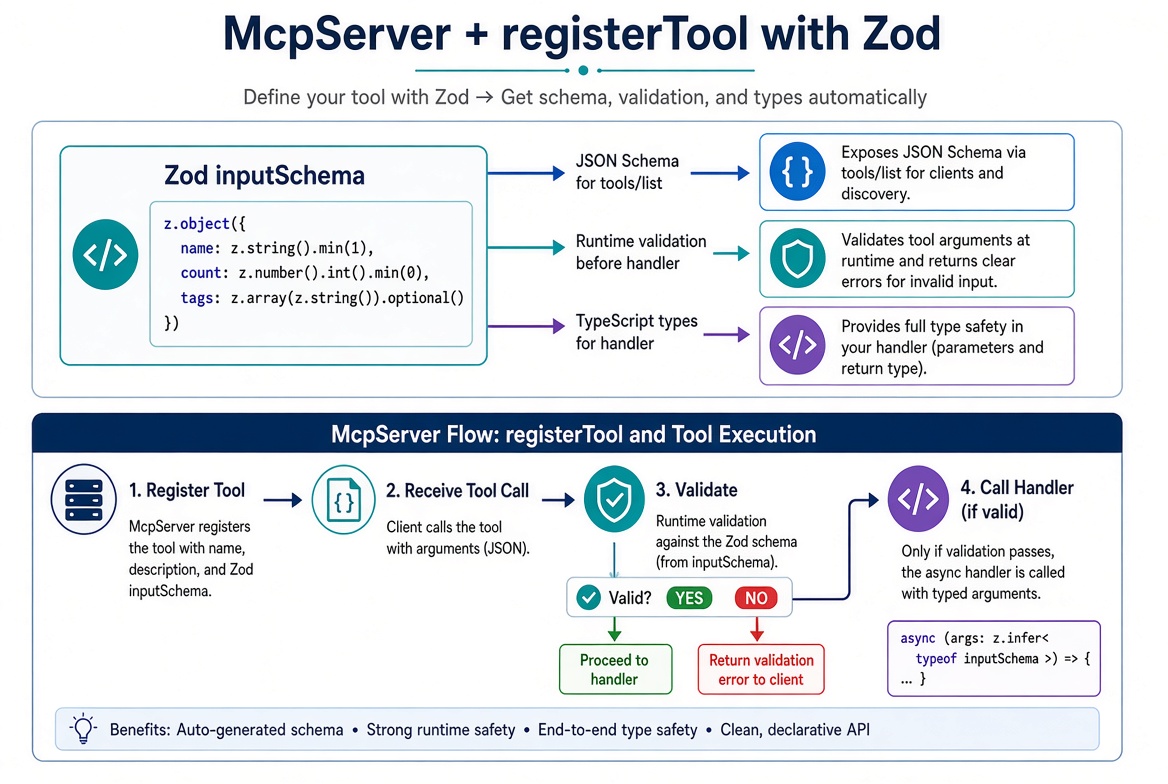
McpServer is the high-level class for building MCP servers.registerTool(name, config, handler) is how you expose an action the model can call.
The single most important part of config is inputSchema — a Zod schema. From that one schema the SDK:
Generates the JSON Schema advertised to the model
Validates every incoming argument before your handler runs
Infers TypeScript types for the handler parameters
Bad arguments become an isError: true tool result the model can read and retry. Your handler only ever sees valid data.
Full Complete Script
Create src/index.ts:
import { McpServer } from '@modelcontextprotocol/server';
import { serveStdio } from '@modelcontextprotocol/server/stdio';
import * as z from 'zod/v4';

// In-memory catalog (replace with a database or API in real apps)
const catalog = [
  { name: 'Espresso cup', price: 12, category: 'drinkware' },
  { name: 'Travel mug', price: 24, category: 'drinkware' },
  { name: 'Mug rack', price: 36, category: 'storage' },
  { name: 'Pour-over kettle', price: 48, category: 'brewing' },
  { name: 'Coffee scale', price: 32, category: 'brewing' }
];

function createServer(): McpServer {
  const server = new McpServer({
    name: 'catalog-server',
    version: '1.0.0'
  });

  server.registerTool(
    'search-products',
    {
      description: 'Search the product catalog by name substring and optional category',
      inputSchema: z.object({
        query: z.string().min(1).describe('Substring to match against product names'),
        category: z.enum(['drinkware', 'storage', 'brewing']).optional()
          .describe('Optional category filter'),
        limit: z.number().int().min(1).max(20).optional()
          .describe('Maximum number of results to return (default 10)')
      })
    },
    async ({ query, category, limit }) => {
      const q = query.toLowerCase();
      let hits = catalog.filter(p => p.name.toLowerCase().includes(q));

      if (category) {
        hits = hits.filter(p => p.category === category);
      }

      const max = limit ?? 10;
      const results = hits.slice(0, max);

      if (results.length === 0) {
        return {
          content: [{ type: 'text', text: `No products found for "${query}".` }]
        };
      }

      const lines = results.map(p => `${p.name} — $${p.price} (${p.category})`);
      return {
        content: [{ type: 'text', text: lines.join('\n') }]
      };
    }
  );

  return server;
}

// Serve over stdio
void serveStdio(createServer);
console.error('catalog MCP server running on stdio');
Key Points in the Script
Factory pattern (createServer): Preferred so the same server definition works for both stdio and later HTTP.
Zod schema:
query is required with a description (shown to the model).
category is an optional enum.
limit has min/max constraints.
Handler: Receives fully typed, already-validated arguments. Only returns content blocks.
Logging: Always use console.error — console.log corrupts the stdio protocol stream.
Run and Test
# Start the server (it waits on stdin)
npx tsx src/index.ts

# In another terminal, open MCP Inspector
npx @modelcontextprotocol/inspector@latest npx tsx src/index.ts
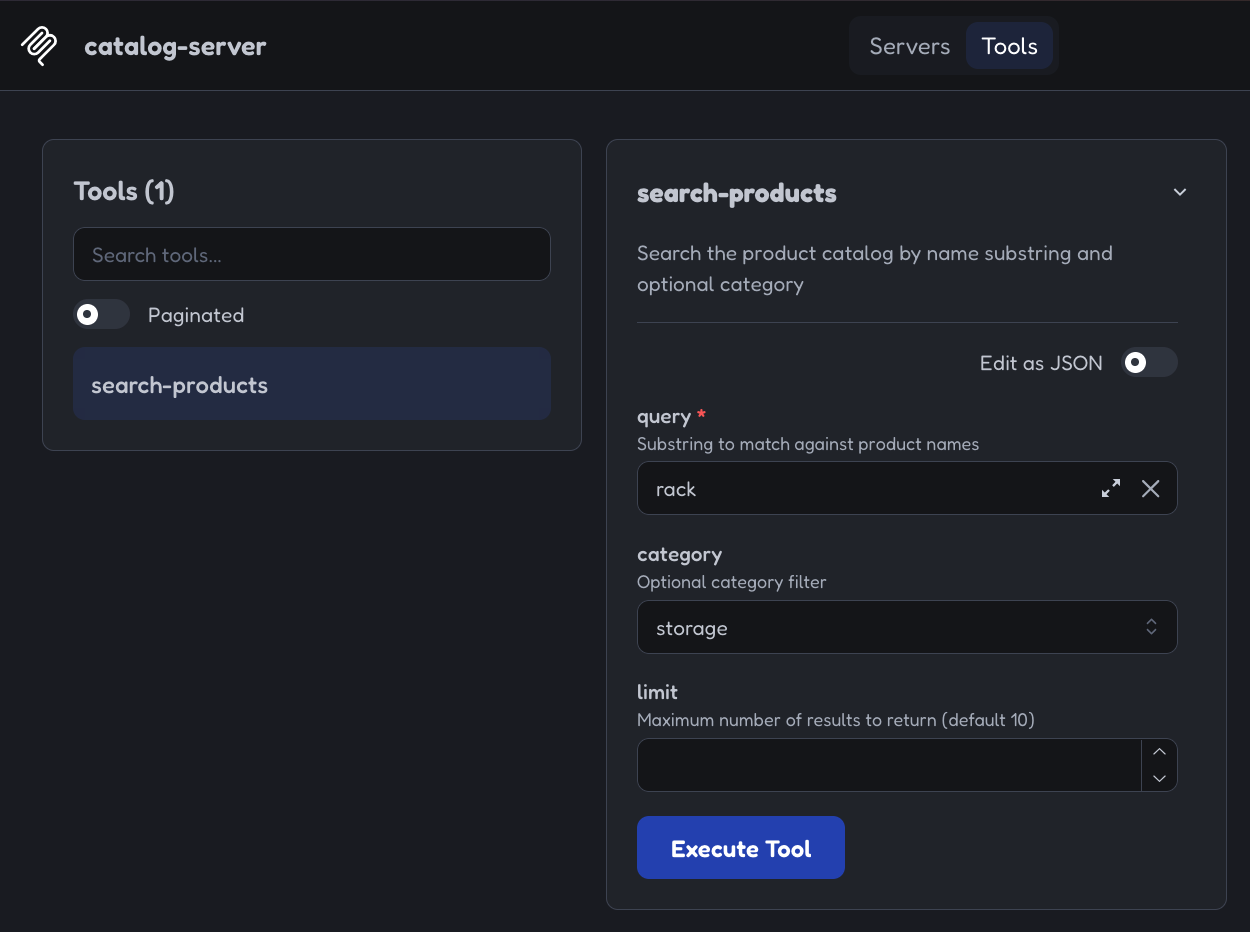
In the Inspector:
Click Connect
Go to the Tools tab
Select search-products
Try valid calls:
{ "query": "mug" }
{ "query": "coffee", "category": "brewing", "limit": 5 }
Try invalid calls to see automatic rejection:
{ "query": "" } → fails min length
{ "query": "mug", "limit": 100 } → fails max
{ "query": "mug", "category": "electronics" } → fails enum
The validation error is returned as a normal tool result with isError: true, so the model can read it and retry.
Common Pitfalls
Forgetting import * as z from 'zod/v4' (or using Zod v3 shape style).
Using console.log instead of console.error.
Putting business logic that can throw without catching — unhandled throws become isError: true results, but explicit returns are clearer.
Not using the factory pattern (makes later HTTP serving harder).
What’s Next
In the next article we will:
Add outputSchema + structuredContent
Return mixed content blocks (text, image, resource)
Annotate tools with title and annotations
Full source for this example is available in the companion repo (link will be added when published).
Get new posts by Nelson Lin
Subscribe to receive email notifications when a new article is published.