Factory Pattern + serveStdio
Module 1 — Your First Server
You already know how to create an McpServer and register tools with Zod. This article covers the factory pattern and serveStdio — the recommended way to expose that server over stdio so hosts (VS Code, Claude Code, Cursor, MCP Inspector, etc.) can launch it as a child process.
The factory is not optional boilerplate. It is simply a function that creates and returns a fresh McpServer instance. This mechanism lets one server definition serve both the modern 2026-07-28 protocol era and older 2025-era clients, and it is the same pattern you will reuse later for HTTP.

A host launches your process. serveStdio owns the stdio transport, calls your factory once per connection, and pins the resulting McpServer instance for the lifetime of that connection. The same factory serves both protocol eras.
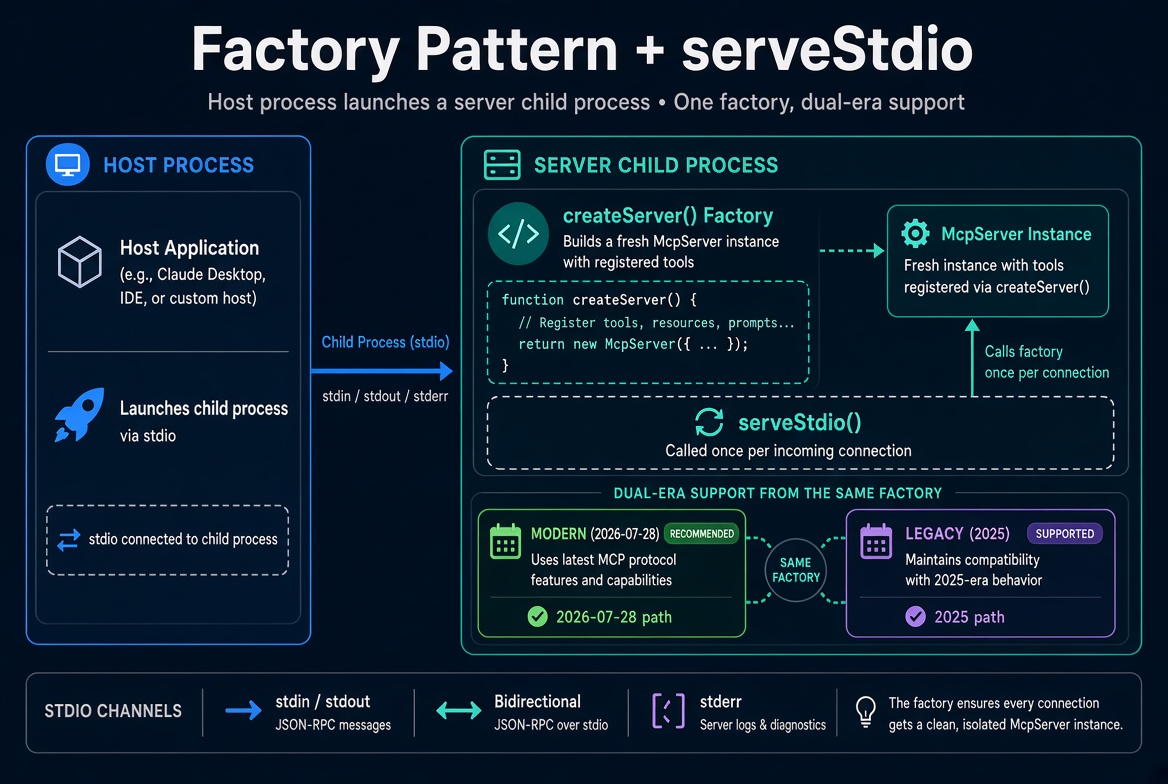
What Is a Factory?
In programming, a factory is a function (or method) whose job is to build and return objects. Instead of writing new McpServer(...) at the top level of your program and then connecting a transport to it, you write a function that does the construction for you.
That function looks like this:
function createServer(): McpServer {
  const server = new McpServer({ name: 'catalog-server', version: '1.0.0' });
  // registerTool, registerResource, registerPrompt ...
  return server;
}
You then hand the function itself to the SDK:
serveStdio(createServer);Why a Factory Instead of a Long-Lived Server?
In the TypeScript SDK v2 you do not create one long-lived McpServer and then connect a transport to it. serveStdio (and later createMcpHandler for HTTP) calls your factory whenever it needs an instance:
Once per stdio connection (the normal case)
Once for a server/discover probe that may be discarded if the client falls back to the 2025 initialize handshake
The factory can optionally receive an McpRequestContext containing the negotiated era ("modern" | "legacy"). Most simple servers ignore the context and register the same tools for both eras. That is the point: define your surface once.
Hand-wiring with new StdioServerTransport() + server.connect(transport) still compiles, but it only serves 2025-era clients. serveStdio owns era negotiation so the same code answers both.
serveStdio in One Call
import { serveStdio } from '@modelcontextprotocol/server/stdio';

const handle = serveStdio(createServer);
console.error('catalog MCP server running on stdio');
What serveStdio does:
Owns the stdio transport (stdin = requests, stdout = responses).
Performs the opening exchange and decides the era.
Calls your factory once and pins that single McpServer instance for the entire connection.
Forwards every subsequent message to the pinned instance.
The process now waits on stdin. A host that spawns it can list and call your tools.
Logging Rule (Critical)
stdout is the JSON-RPC channel. The host parses every line as a protocol message.
Always log with console.error (stderr):
console.error('catalog MCP server running on stdio');
console.error('Loaded 42 products');
A single console.log injects a non-JSON line into stdout and typically causes the host to drop the connection with a parse error.
Full Complete Script
This continues the catalog example from the previous article.
import { McpServer } from '@modelcontextprotocol/server';
import { serveStdio } from '@modelcontextprotocol/server/stdio';
import * as z from 'zod/v4';

const catalog = [
  { name: 'Espresso cup', price: 12, category: 'drinkware' },
  { name: 'Travel mug', price: 24, category: 'drinkware' },
  { name: 'Mug rack', price: 36, category: 'storage' },
  { name: 'Pour-over kettle', price: 48, category: 'brewing' },
  { name: 'Coffee scale', price: 32, category: 'brewing' }
];

export function createServer(): McpServer {
  const server = new McpServer({
    name: 'catalog-server',
    version: '1.0.0'
  });

  server.registerTool(
    'search-products',
    {
      description: 'Search the product catalog by name substring and optional category',
      inputSchema: z.object({
        query: z.string().min(1).describe('Substring to match against product names'),
        category: z.enum(['drinkware', 'storage', 'brewing']).optional()
          .describe('Optional category filter'),
        limit: z.number().int().min(1).max(20).optional()
          .describe('Maximum number of results to return (default 10)')
      })
    },
    async ({ query, category, limit }) => {
      const q = query.toLowerCase();
      let hits = catalog.filter(p => p.name.toLowerCase().includes(q));
      if (category) hits = hits.filter(p => p.category === category);
      const results = hits.slice(0, limit ?? 10);

      if (results.length === 0) {
        return { content: [{ type: 'text', text: `No products found for "${query}".` }] };
      }

      const lines = results.map(p => `${p.name} — $${p.price} (${p.category})`);
      return { content: [{ type: 'text', text: lines.join('\n') }] };
    }
  );

  return server;
}

// Entry point
const handle = serveStdio(createServer);
console.error('catalog MCP server running on stdio');

// Optional clean shutdown
process.on('SIGINT', () => {
  void handle.close();
});
Dual-Era Support from the Same Factory
By default serveStdio serves both eras:
Opening | Era | Behavior |
|---|---|---|
Modern (2026-07-28 envelope / |
| Pins a modern instance from the factory |
2025-style |
| Pins a legacy instance from the same factory (default) |
You can change the posture:
// Reject legacy clients (modern-only)
serveStdio(createServer, { legacy: 'reject' });

// Explicitly serve legacy (this is already the default)
serveStdio(createServer, { legacy: 'serve' });
Under 'reject', a 2025 opening receives an unsupported-protocol-version error; the connection stays open so a modern client can still negotiate.
The factory can inspect the context if you ever need era-specific behavior:
import type { McpRequestContext } from '@modelcontextprotocol/server';

function createServer(ctx?: McpRequestContext): McpServer {
  const server = new McpServer({ name: 'catalog-server', version: '1.0.0' });
  // register tools...
  if (ctx?.era === 'modern') {
    // optionally register extra modern-only surface
  }
  return server;
}
For almost all servers you ignore the context and register the same surface for both eras.
Clean Shutdown
serveStdio returns a StdioServerHandle:
const handle = serveStdio(createServer);

process.on('SIGINT', () => {
  void handle.close(); // closes the pinned instance + transport
});
When the host closes its end of the pipe (stdin reaches EOF), the transport closes automatically. Requests still in flight are aborted. If you hold keep-alive resources (timers, connection pools, file watchers), release them on close so the process can exit:
serveStdio(() => {
  const server = new McpServer({ name: 'catalog-server', version: '1.0.0' });
  // ... register tools ...

  const heartbeat = setInterval(() => console.error('still serving'), 60_000);
  server.server.onclose = () => clearInterval(heartbeat);

  return server;
});
Testing with MCP Inspector
npx @modelcontextprotocol/inspector npx tsx src/index.tsClick Connect. The Tools tab lists everything the factory registered. You can also force eras with the Inspector CLI flags (--protocol-era modern / legacy) to verify both paths.
serveStdio Options (Reference)
Option | Default | Purpose |
|---|---|---|
|
|
|
|
| Cap on open |
| — | Callback for out-of-band errors (does not affect the wire) |
| process stdio | Bring your own transport (e.g. over a Unix socket) |
Common Pitfalls
Using console.log (corrupts stdout). Always console.error.
Creating the McpServer outside the factory and sharing it. The factory must return a fresh instance each call.
Forgetting that hand-wired StdioServerTransport only serves legacy clients.
Holding timers or sockets without releasing them on server.server.onclose — the process never exits.
Putting side effects that should run only once (DB connection pools, caches) inside the factory instead of at module scope. Close over them.
What’s Next
You now have a correctly served stdio server. Next articles cover:
Error handling basics (isError: true)
Testing with MCP Inspector in more depth
Connecting the server to real hosts (VS Code, Claude Code, Cursor)
The same createServer factory will later be handed to createMcpHandler for Streamable HTTP — one definition, two transports.
Official anchors:
Serve over stdio · serveStdio API · Legacy clients · Build your first server
Get new posts by Nelson Lin
Subscribe to receive email notifications when a new article is published.