Core Primitives: Tools, Resources, and Prompts
Module 0 — Foundations
MCP servers expose three core primitives that AI hosts can use. Understanding the difference between them is essential before you write any code. This article introduces Tools, Resources, and Prompts using the official TypeScript SDK v2.
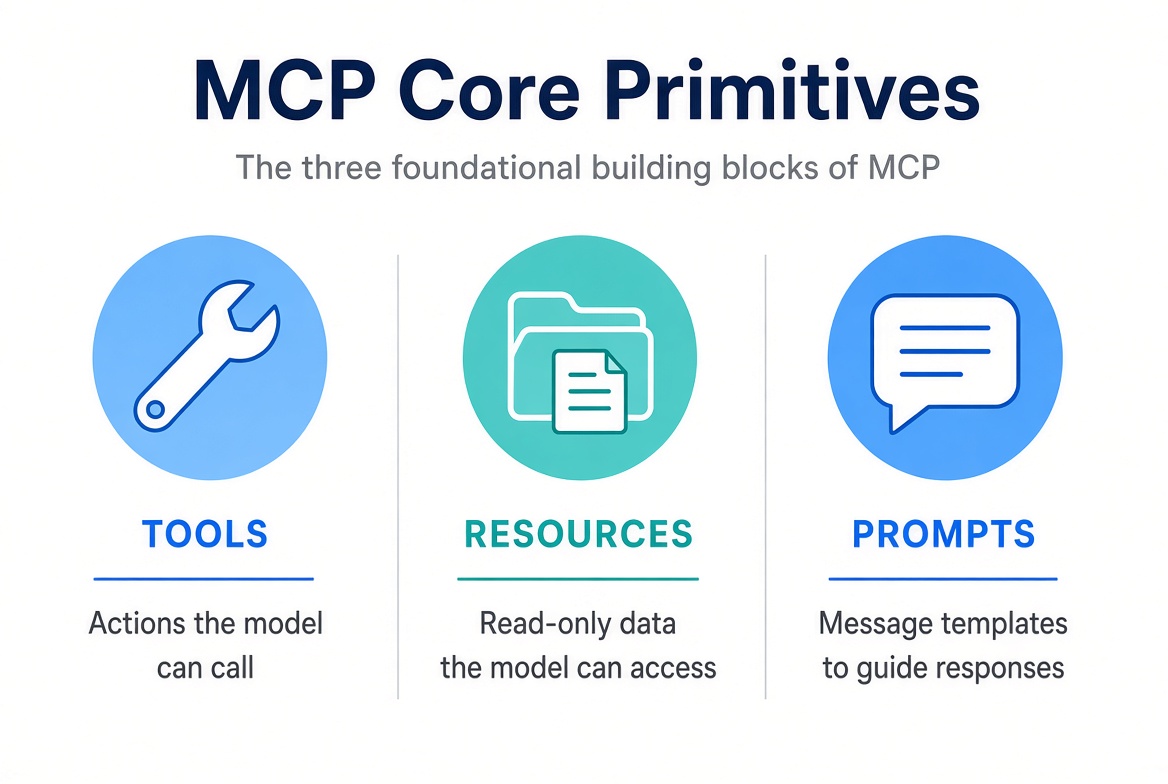
The Three Building Blocks

Tools are actions the model can call. Resources are read-only data. Prompts are reusable message templates.
Primitive | Who controls it? | Purpose | Typical use |
|---|---|---|---|
Tools | The model (via the host) | Take actions, compute, or cause side effects | Query a database, send an email, fetch weather |
Resources | The application / user | Provide read-only context | Files, database rows, configuration, reports |
Prompts | The user (via the host UI) | Supply reusable message templates | Slash commands, guided workflows, code-review templates |
Tools
A tool is an action a connected client (and the model driving it) can invoke on your server.
You register tools with registerTool. The inputSchema is a Zod object (Standard Schema). The SDK turns it into JSON Schema for the host, validates arguments before your handler runs, and infers TypeScript types for you.
import { McpServer } from '@modelcontextprotocol/server';
import * as z from 'zod/v4';

const server = new McpServer({ name: 'catalog', version: '1.0.0' });

server.registerTool(
  'search',
  {
    description: 'Search the product catalog',
    inputSchema: z.object({
      query: z.string().describe('Substring to match against product names'),
      limit: z.number().int().max(50).optional()
    })
  },
  async ({ query, limit }) => {
    // ... search logic
    return { content: [{ type: 'text', text: 'Espresso cup\nTravel mug' }] };
  }
);
Tool results return content blocks (text, image, audio, resource, resource_link). You can also declare an outputSchema and return validated structuredContent for the host’s application code.
Annotations such as readOnlyHint or destructiveHint help hosts decide whether to ask the user for confirmation. They do not change execution.
Resources
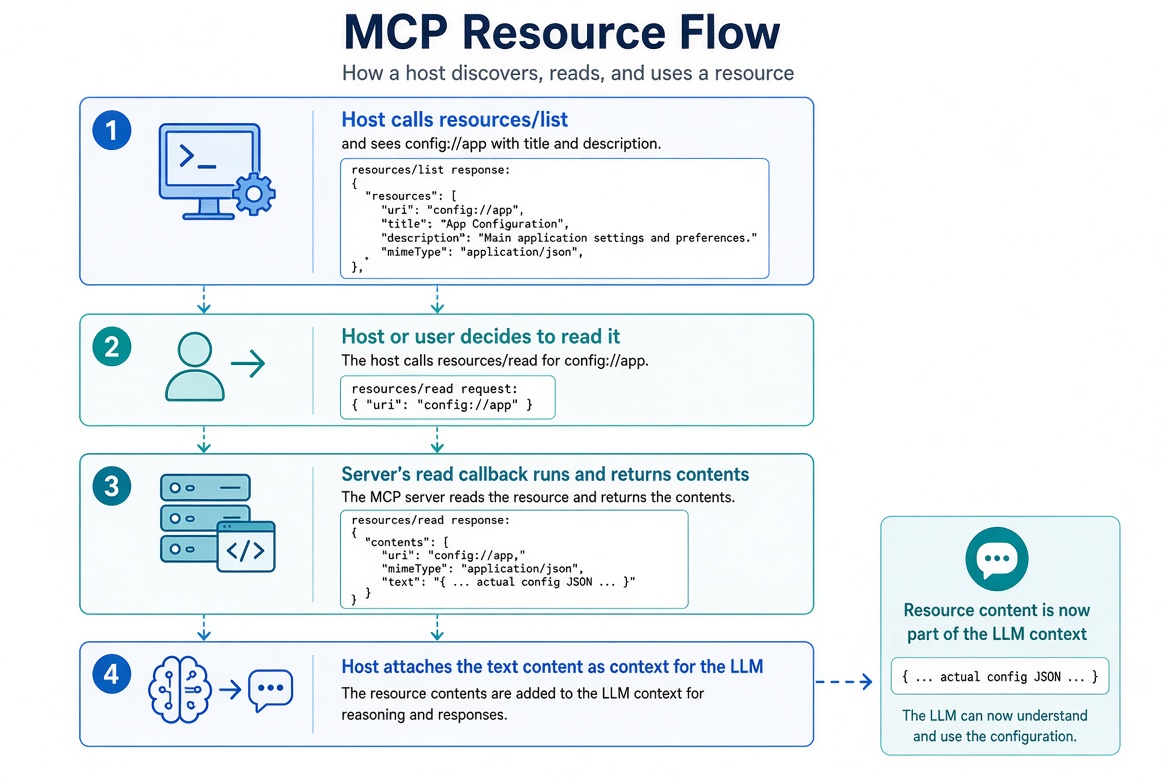
A resource is read-only data — a file, a database row, a rendered report, or configuration — that a client can list and read, then attach as context for the model.
Resources are application-controlled: the host (or the user through the host’s UI) decides what to read. The model does not call resources the way it calls tools. The host fetches the content and injects it into the conversation context.
Static resource example
import { McpServer } from '@modelcontextprotocol/server';

const server = new McpServer({ name: 'workspace', version: '1.0.0' });

server.registerResource(
  'config',                    // internal name (not exposed to clients)
  'config://app',              // URI clients use to address this resource
  {
    title: 'Application Config',
    description: 'Application configuration data',
    mimeType: 'text/plain'
  },
  async (uri) => ({            // read callback — called only on resources/read
    contents: [{
      uri: uri.href,           // echo the requested URI
      text: 'log_level=info\nregion=eu-west-1'
    }]
  })
);
What each piece means
Piece | Role |
|---|---|
| Internal identifier the server uses to refer to this resource. Clients never see this name. |
| The URI clients use. Custom schemes ( |
Metadata object |
|
| The read callback. It runs only when a client actually requests the content. The |
The callback is lazy: listing a resource does not execute it. Only an explicit read does.
How the LLM Host uses it
Discovery — The host calls resources/list (or the client SDK’s listResources()). It receives entries like:
{
  "uri": "config://app",
  "name": "config",
  "title": "Application Config",
  "description": "Application configuration data",
  "mimeType": "text/plain"
}
Decision — The host or the user chooses which resources are relevant. This might be automatic (host always attaches certain URIs) or manual (user picks from a list in the UI).
Read — The host calls resources/read with { uri: "config://app" }. The server runs the read callback and returns the contents.
Context injection — The host takes the returned text (or blob) and attaches it to the conversation so the model can see it. Typical patterns:
Prepend it as a system or user message: “Here is the current application configuration: …”
Attach it as a resource content block inside a prompt or tool result.
Make it available for the model to reference without the model having to request it itself.
Because resources are read-only and host-controlled, they are ideal for background context (config, docs, recent records) that the model should know about but should not actively “call.”

Host lists resources, decides to read one, server returns contents, host attaches them as LLM context.
URI templates (dynamic resources)
For resources that vary by parameter you use ResourceTemplate:
import { ResourceTemplate } from '@modelcontextprotocol/server';

server.registerResource(
  'user-profile',
  new ResourceTemplate('users://{userId}/profile', { list: undefined }),
  {
    title: 'User Profile',
    description: 'Profile data for one user',
    mimeType: 'application/json'
  },
  async (uri, { userId }) => ({
    contents: [{
      uri: uri.href,
      mimeType: 'application/json',
      text: JSON.stringify({ userId, plan: 'pro' })
    }]
  })
);
The template is advertised via resources/templates/list.
If you supply a list callback, concrete instances also appear in resources/list.
The read callback receives the parsed variables ({ userId }) as its second argument.
You can also register URI templates with ResourceTemplate for dynamic resources (for example users://{userId}/profile). Clients list concrete instances (when you provide a list callback) or construct URIs themselves.
Prompts
A prompt is a message template a connected client invokes by name. Prompts are user-controlled: the user (through the host’s UI) explicitly selects them. The model does not choose prompts the way it chooses tools.
Hosts typically surface prompts as:
Slash commands (e.g. /review-code or /mcp__server__review-code)
Menu entries
Command-palette items
Guided forms
server.registerPrompt(
  'review-code',
  {
    title: 'Code Review',
    description: 'Review code for best practices and potential issues',
    argsSchema: z.object({
      code: z.string().describe('The code to review')
    })
  },
  ({ code }) => ({
    messages: [
      {
        role: 'user',
        content: { type: 'text', text: `Review this code:\n\n${code}` }
      }
    ]
  })
);
The callback returns { messages }. Each message has a role (user or assistant) and one content block (text, image, audio, resource, or resource_link). You can include a trailing assistant message to seed how the model should start its reply. You can also embed a registered resource directly inside a message.
How the LLM Host uses prompts
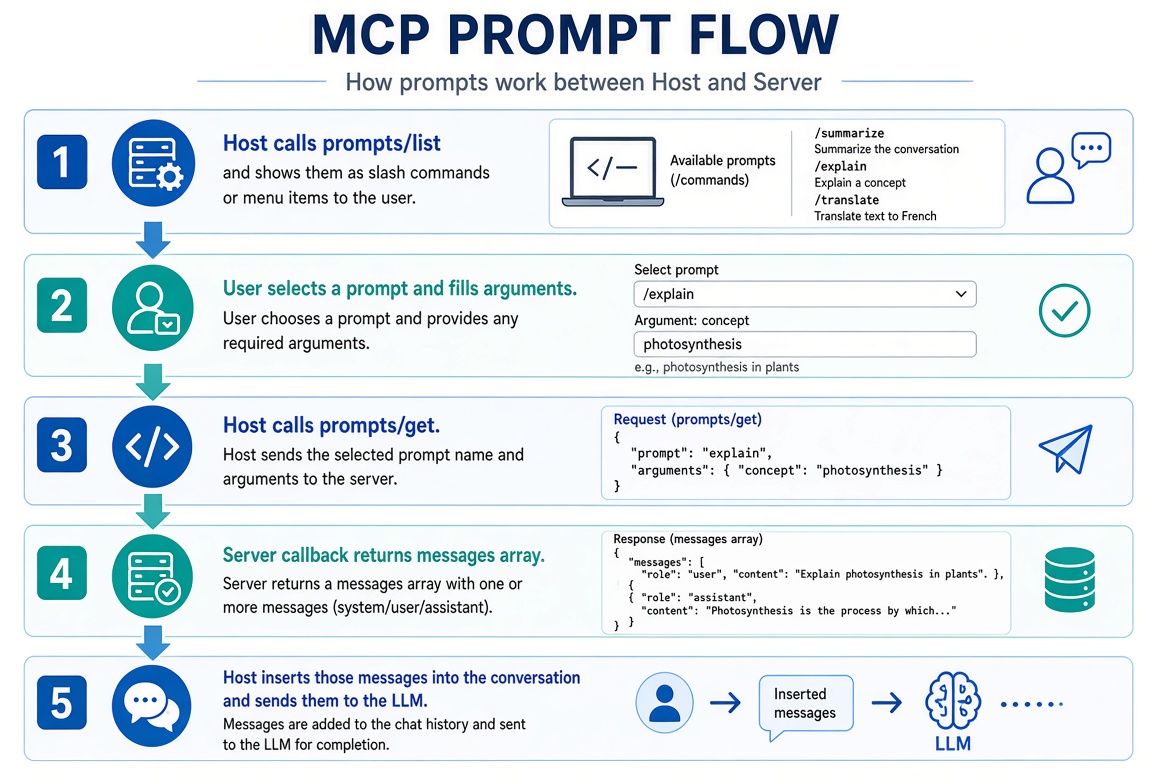
Discovery — The host calls prompts/list. It receives each prompt’s name, title, description, and argument schema (derived from argsSchema).
User selection — The host shows the prompts in its UI. The user picks one (often by typing / and choosing a slash command) and supplies any required arguments.
Get — The host calls prompts/get with the prompt name and the argument values. The server validates the arguments against argsSchema and runs the callback.
Message insertion — The host receives a ready-to-use messages array. It inserts those messages into the conversation (or starts a new turn with them) and sends them to the LLM.
Model response — The LLM sees the filled-in template exactly as the server designed it and continues the conversation from there.
Example of what the host receives after a user invokes /review-code with some code:
{
  "messages": [
    {
      "role": "user",
      "content": {
        "type": "text",
        "text": "Review this code:\n\nfunction add(a, b) { return a + b }"
      }
    }
  ]
}
The host can then treat this as the next user message and let the model reply.

User selects a prompt (slash command), host calls prompts/get, server returns messages, host sends them to the LLM.
Because prompts are user-initiated and return complete messages, they are ideal for standardized workflows (code review, summarization, ticket triage, etc.) that you want people to trigger deliberately.
How They Work Together
A realistic server often mixes all three:
Tools for actions the model should decide to take.
Resources for background context the host can attach.
Prompts for guided user workflows that produce ready-to-send messages.
In the TypeScript SDK these are registered on the same McpServer instance and served over the same transport.
What You’ll Do Next
With the three primitives clear, the next articles cover the protocol eras, the SDK packages and factory pattern, and how to set up your environment so you can start building.
Official references
Get new posts by Nelson Lin
Subscribe to receive email notifications when a new article is published.