Completion: Autocomplete for Prompts and Resource Templates
Module 2 — Core Server Features
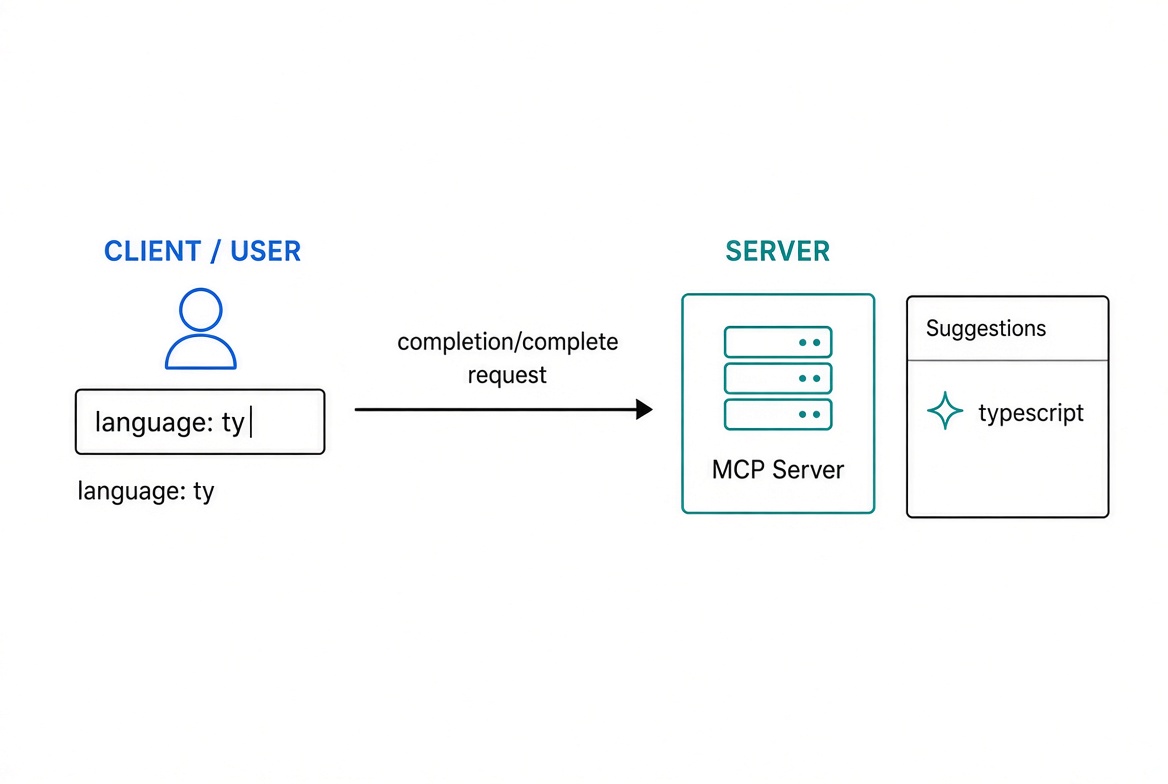
Completion is server-side autocomplete for prompt arguments and resource template variables. As the user types a partial value in the host UI, the client asks your server for matching suggestions. Your callback returns the list of matches.
This article covers:
Wrapping prompt arguments with completable
Returning suggestions (sync or async)
Context-aware completions that depend on other arguments
Completing variables on ResourceTemplate
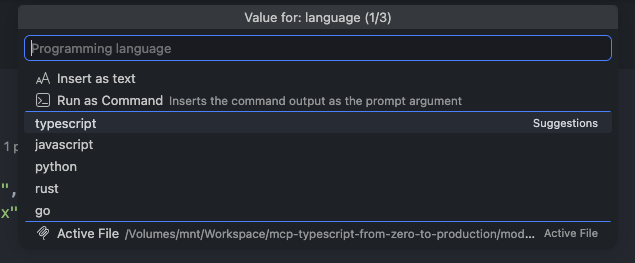
How hosts (and the MCP Inspector) request and display completions
A complete, runnable catalog example
All code uses the official TypeScript SDK v2 (@modelcontextprotocol/server) and the 2026-07-28 protocol era.

The user types a partial value. The host sends completion/complete. The server runs your callback and returns matching suggestions. The host shows them in a dropdown or similar UI.
Concept + Why It Matters
Aspect | Prompt completion | Resource template completion |
|---|---|---|
What is completed? | An argument in | A variable in a URI template |
How you declare it |
|
|
Reference in request |
|
|
Context available | Other already-filled prompt arguments | Other already-filled template variables |
Completions turn free-text fields into guided inputs. They are especially useful for:
Programming languages, frameworks, or package names
Repository names, branches, file paths
User IDs, product SKUs, team names
Any value the server can look up or filter
The first time you register a completable prompt argument (or a resource template with a complete map), the SDK automatically:
Registers the completion/complete request handler.
Advertises the completions capability.
You do not declare the capability yourself.
Prompt Completions with completable
completable wraps one field of a prompt’s argsSchema. The underlying Zod schema still validates exactly as before. The second argument is a callback that receives the partial value typed so far and returns the matching suggestions.
import { completable, McpServer } from '@modelcontextprotocol/server';
import * as z from 'zod/v4';

const languages = ['typescript', 'javascript', 'python', 'rust', 'go'];

const server = new McpServer({ name: 'catalog', version: '1.0.0' });

server.registerPrompt(
  'review-code',
  {
    title: 'Code Review',
    description: 'Review code for best practices',
    argsSchema: z.object({
      language: completable(
        z.string().describe('Programming language'),
        value => languages.filter(lang => lang.startsWith(value))
      ),
      code: z.string().describe('The code to review')
    })
  },
  ({ language, code }) => ({
    messages: [
      {
        role: 'user',
        content: {
          type: 'text',
          text: `Review this ${language} code for best practices:\n\n${code}`
        }
      }
    ]
  })
);
A completion request for language with the partial value "ty" returns:
{
  "values": ["typescript"],
  "total": 1,
  "hasMore": false
}
Callback Signature
type CompleteCallback = (
  value: string,
  context?: { arguments?: Record<string, string> }
) => string[] | Promise<string[]>;
Return the full list of matches. The SDK automatically:
Caps values at 100 items
Sets total to the original length
Sets hasMore: true when truncation occurs
The callback can be synchronous or async.
Never throw when context is missing — return an empty array instead.
Context-Aware Completions
The optional second parameter gives you the values the client has already filled in for the other arguments. This lets one field’s suggestions depend on another.
const branchesByRepo: Record<string, string[]> = {
  'typescript-sdk': ['main', 'release/1.x', 'release/2.x'],
  'python-sdk': ['main', 'release/1.x'],
  inspector: ['main']
};

async function listRepos(): Promise<string[]> {
  return Object.keys(branchesByRepo);
}

async function completeBranch(
  value: string,
  context?: { arguments?: Record<string, string> }
): Promise<string[]> {
  const repo = context?.arguments?.repo;
  if (!repo) return [];
  return (branchesByRepo[repo] ?? []).filter(b => b.startsWith(value));
}

server.registerPrompt(
  'review-pr',
  {
    title: 'Review Pull Request',
    description: 'Review open pull requests on one branch',
    argsSchema: z.object({
      repo: completable(
        z.string().describe('Repository name'),
        async value => {
          const repos = await listRepos();
          return repos.filter(r => r.startsWith(value));
        }
      ),
      branch: completable(
        z.string().describe('Target branch'),
        completeBranch
      )
    })
  },
  ({ repo, branch }) => ({
    messages: [
      {
        role: 'user',
        content: {
          type: 'text',
          text: `Review the open pull requests on ${repo}@${branch}.`
        }
      }
    ]
  })
);
When the client has already filled repo: "typescript-sdk" and the user types "rel" for branch, the callback returns ["release/1.x", "release/2.x"].
Resource Template Completions
Resource template variables are completed through the complete option on ResourceTemplate. Each key is a variable name; the value is a callback with the same signature. Do not use completable for resource templates — it is only for prompt arguments.
import { ResourceTemplate } from '@modelcontextprotocol/server';

server.registerResource(
  'readme',
  new ResourceTemplate('repo://{repo}/readme', {
    list: undefined,
    complete: {
      repo: async value => {
        const repos = await listRepos();
        return repos.filter(r => r.startsWith(value));
      }
    }
  }),
  {
    title: 'Repository README',
    description: 'The README of one repository',
    mimeType: 'text/plain'
  },
  async (uri, { repo }) => ({
    contents: [
      {
        uri: uri.href,
        mimeType: 'text/plain',
        text: `README for ${repo}`
      }
    ]
  })
);
The completion request targets the template by its URI pattern:
{
  "ref": { "type": "ref/resource", "uri": "repo://{repo}/readme" },
  "argument": { "name": "repo", "value": "py" }
}
This returns ["python-sdk"].
How Hosts Use Completions
Hosts (and the MCP Inspector) issue completion/complete as the user types. Typical flow:
User selects a prompt or begins filling a resource template URI.
As they type in an argument/variable field, the host debounces and sends:
{
  "method": "completion/complete",
  "params": {
    "ref": { "type": "ref/prompt", "name": "review-code" },
    "argument": { "name": "language", "value": "ty" },
    "context": { "arguments": { /* already filled fields */ } }
  }
}
The server runs your callback and returns the suggestions.
The host displays them (dropdown, inline suggestions, etc.).
In the MCP Inspector you can fill prompt arguments and see the suggestions appear live.
From a client you can call:
const result = await client.complete({
  ref: { type: 'ref/prompt', name: 'review-code' },
  argument: { name: 'language', value: '' }
});
// result.completion.values → full list
Complete Catalog Example
Here is a self-contained server that demonstrates both prompt and resource template completions:
import { completable, McpServer, ResourceTemplate } from '@modelcontextprotocol/server';
import * as z from 'zod/v4';

const languages = ['typescript', 'javascript', 'python', 'rust', 'go'];

const branchesByRepo: Record<string, string[]> = {
  'typescript-sdk': ['main', 'release/1.x', 'release/2.x'],
  'python-sdk': ['main', 'release/1.x'],
  inspector: ['main']
};

async function listRepos() {
  return Object.keys(branchesByRepo);
}

function createServer() {
  const server = new McpServer({ name: 'catalog', version: '1.0.0' });

  // Prompt with simple + context-aware completions
  server.registerPrompt(
    'review-code',
    {
      title: 'Code Review',
      description: 'Review code in a chosen language',
      argsSchema: z.object({
        language: completable(
          z.string().describe('Programming language'),
          value => languages.filter(l => l.startsWith(value))
        ),
        repo: completable(
          z.string().describe('Repository'),
          async value => (await listRepos()).filter(r => r.startsWith(value))
        ),
        branch: completable(
          z.string().describe('Branch'),
          (value, ctx) => {
            const repo = ctx?.arguments?.repo;
            if (!repo) return [];
            return (branchesByRepo[repo] ?? []).filter(b => b.startsWith(value));
          }
        )
      })
    },
    ({ language, repo, branch }) => ({
      messages: [
        {
          role: 'user',
          content: {
            type: 'text',
            text: `Review the ${language} code on ${repo}@${branch}.`
          }
        }
      ]
    })
  );

  // Resource template with completion
  server.registerResource(
    'readme',
    new ResourceTemplate('repo://{repo}/readme', {
      list: undefined,
      complete: {
        repo: async value => (await listRepos()).filter(r => r.startsWith(value))
      }
    }),
    {
      title: 'Repository README',
      description: 'README for a repository',
      mimeType: 'text/plain'
    },
    async (uri, { repo }) => ({
      contents: [{ uri: uri.href, text: `# ${repo}\n\nREADME content here.` }]
    })
  );

  return server;
}

export default createServer;
Recap
Use completable(schema, callback) to add autocomplete to any prompt argument. Validation stays unchanged.
The callback receives the partial value (and optional context) and returns the matching suggestions (sync or async).
The SDK handles truncation (values ≤ 100), total, and hasMore.
For resource templates, supply a complete map of callbacks on the ResourceTemplate constructor.
The first registration of either kind automatically advertises the completions capability and installs the handler.
Hosts such as the MCP Inspector request completions as the user types and display the returned values.
Completions are a small addition that makes prompts and templated resources feel polished and guided instead of free-text only. Add them wherever the set of valid values is known or can be looked up.
Get new posts by Nelson Lin
Subscribe to receive email notifications when a new article is published.