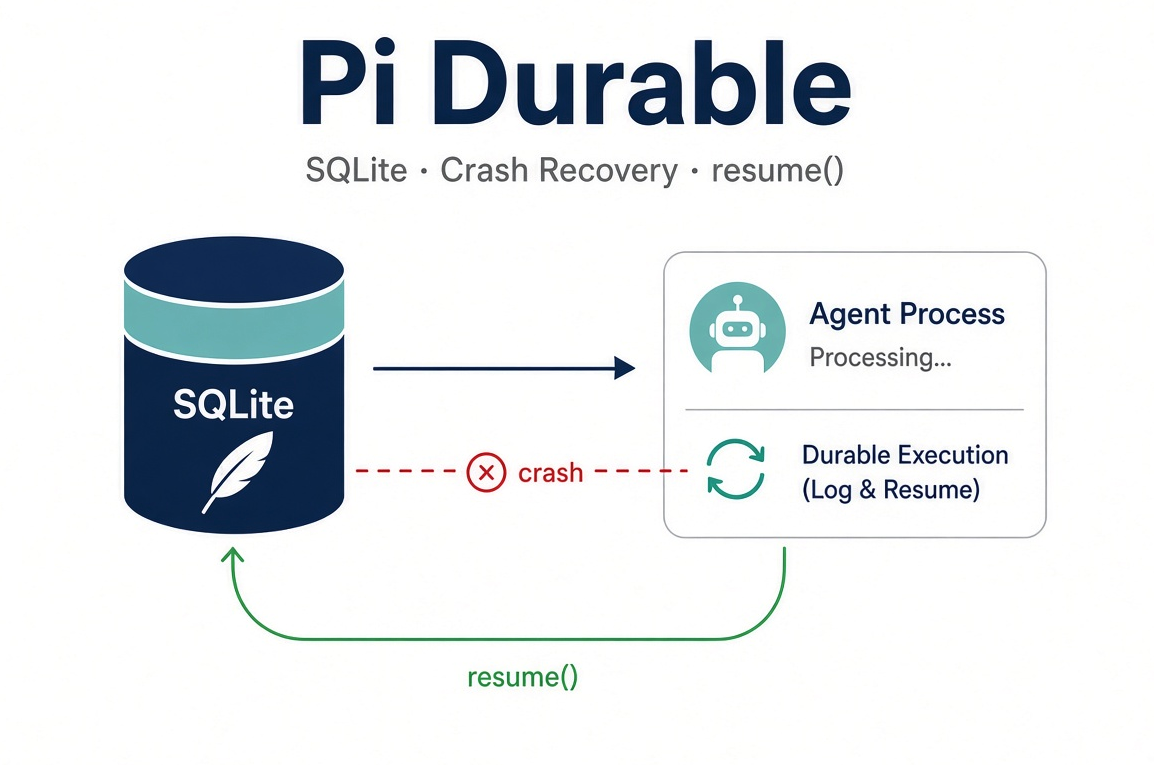
Pi Durable Persistence — SQLite, Crash Recovery, and resume()
What You Will Learn
In the previous article we ran our first durable conversation using in-memory storage. That was perfect for learning the API, but the moment the process exited, everything vanished.
This article turns that conversation into something that can outlive the process. You will get:
A complete, runnable script that uses SQLite persistence
How to open a harness with openNodeSqliteStorage
What is actually stored (entries, tasks, checkpoints, documents, submissions)
How crash recovery works at the task level
The role of harness.resume()
Why some tools are replay-safe and others are not
Practical patterns for requestId idempotency
Important limitations of the SQLite backend
By the end you will be able to kill a running agent mid-tool-call and have a new process pick the work up exactly where it left off.
Complete Runnable Script
Save this as src/index.ts. It continues from Article 2’s third-party LLM Gateway + Deepseek V4.1 Flash setup and adds SQLite persistence, a replay-safe tool, and resume().
import { loadEnvFile } from "node:process";
loadEnvFile(); // loads .env into process.env

import { BACKGROUND_CONTEXT } from "@earendil-works/chord/context";
import {
  AssistantEntry,
  createRegistry,
  defineExtension,
  defineTool,
  Harness,
} from "@earendil-works/pi-durable";

import { openNodeSqliteStorage } from "@earendil-works/pi-durable/storage/sqlite/node";

import {
  createModels,
  createProvider,
  envApiKeyAuth,
  type Model,
} from "@earendil-works/pi-ai";

import { openAICompletionsApi } from "@earendil-works/pi-ai/api/openai-completions.lazy";
import { lit, obj, oneOf, str } from "@earendil-works/pi-schema";

const context = BACKGROUND_CONTEXT;

// ---------------------------------------------------------------------------
// Model + provider (same as Article 2)
// ---------------------------------------------------------------------------

const deepseekFlashV41Model: Model<"openai-completions"> = {
  id: "deepseek/deepseek-v4.1-flash",
  name: "Deepseek V4.1 Flash",
  api: "openai-completions",
  provider: "llm-gateway",
  baseUrl: "https://api.llm-gateway.io/openai/v1",
  reasoning: true,
  input: ["text"],
  cost: { input: 0.3, output: 1.2, cacheRead: 0.003, cacheWrite: 0 },
  contextWindow: 1_024_000,
  maxTokens: 8192,
};

const LLMProvider = createProvider({
  id: "llm-gateway",
  name: "LLM Gateway",
  baseUrl: "https://api.llm-gateway.io/openai/v1",
  auth: {
    apiKey: envApiKeyAuth("LLM Gateway API key", ["LLM_GATEWAY_API_KEY"]),
  },
  models: [deepseekFlashV41Model],
  api: openAICompletionsApi(),
});

const models = createModels();
models.setProvider(LLMProvider);

// ---------------------------------------------------------------------------
// Replay-safe tool (safe to re-run after a crash)
// ---------------------------------------------------------------------------

const serviceStatus = defineTool({
  name: "service_status",
  description: "Read the current status of a demo service (website or checkout)",
  parameters: obj({
    service: oneOf(["website", "checkout"]),
  }),
  replay: "safe", // ← critical for automatic recovery
  execute: async ({ service }, api) => {
    api.output(`Checking ${service}...\n`);
    console.log(`Tool started: ${service} (you can pkill -9 -f index.ts)`);
    // Simulate work so you have time to kill the process
    await new Promise((resolve) => setTimeout(resolve, 12_000));
    const status = service === "checkout" ? "degraded" : "healthy";
    return {
      output: [{ type: "text", text: JSON.stringify({ service, status }) }],
    };
  },
});

const StatusExtension = defineExtension({
  name: "status",
  tools: [serviceStatus],
});

const registry = createRegistry();
registry.install(StatusExtension);

// ---------------------------------------------------------------------------
// Open SQLite storage + harness
// ---------------------------------------------------------------------------

const storage = await openNodeSqliteStorage("./session.sqlite");

const harness = await Harness.open(storage, { models, registry }, context);

try {
  const root = await harness.root(context, {
    agent: {
      model: {
        provider: "llm-gateway",
        modelId: "deepseek/deepseek-v4.1-flash",
      },
      instructions:
        "Use the service_status tool for any service questions. Explain the result briefly.",
    },
  });

  // Recover any unfinished work from a previous process
  harness.resume();

  // Stable requestId so a restart reuses the same submission
  const requestId = "demo-checkout-status-1";

  console.log("Submitting… (requestId =", requestId + ")");

  const submission = await root.submit(
    {
      type: "input",
      content: "Use service_status to check the checkout service and explain the result.",
      requestId,
    },
    context,
  );

  console.log("Submission id:", submission.id);

  const settled = await submission.wait(context);

  if (settled.status === "done" && settled.type === "input") {
    const answer = await root.commit(
      (tx) => tx.entry(AssistantEntry, settled.answer),
      context,
    );
    console.log("\nAnswer:");
    console.log(answer?.model?.[0]);
  } else {
    console.error("Submission failed or was unanswered:", settled);
  }
} finally {
  await harness.close(context);
  console.log("Harness closed.");
}
Environment file
Create .env in the project root (and add it to .gitignore):
LLM_GATEWAY_API_KEY=sk-your-key-hereInstall the schema package
Tool parameters now use @earendil-works/pi-schema (breaking change in pi-ai / pi-durable 1.5.0+). Install it if you have not already:
npm install @earendil-works/pi-schemaRun it
npx tsx src/index.tsHow to test crash recovery
Run the script.
When you see Tool started: checkout, note the process ID (pgrep -fl durable.ts or look in your process list).
In another terminal: pkill -9 -f index.ts
Run the same command again: npx tsx src/index.ts
You will see:
The same submission id printed
The tool run again (because it is marked replay: "safe")
The model produce the final answer
The SQLite file session.sqlite (and its WAL/SHM sidecars) holds the durable state.
Why Persistence Matters
A traditional agent keeps its transcript and intermediate state in process memory. When the process dies:
In-flight model requests are lost
Tool calls that had already started may have side-effects but no recorded result
Queued user messages disappear
Application documents (todos, research state, etc.) are gone
Pi Durable flips the model: nothing is shown until it is committed. Every step of a run is a task that writes a checkpoint before it continues. After a crash you reopen the same storage and call resume().
Conversations, model turns, tool calls, and your own state are committed to storage before anything is shown.
If the process dies mid-turn, reopening the storage picks the work up where it stopped.
Storage Backends at a Glance
Backend | How to open | Persistence | Memory profile | Notes |
|---|---|---|---|---|
|
| None | Everything in RAM | Ideal for tests and demos |
SQLite |
| File-backed | Working set only | Recommended for most apps |
JSONL |
| Append-only files | Entire history in RAM | Useful for debugging or simple cases |
Cloudflare DO |
| Durable Object SQLite | Working set | Official example exists |
We focus on the Node SQLite backend in this article because it is the most practical choice for long-running agents.
What openNodeSqliteStorage Does
Creates or opens a single SQLite file
Runs in WAL mode with synchronous = NORMAL
Automatically migrates the schema on open
Keeps only the active working set in memory; older entries stay on disk until needed
Important durability note:
Commits survive a normal process crash (kill -9, OOM, uncaught exception). A sudden power loss or host failure can lose the newest commit because of synchronous = NORMAL. If you need stronger durability guarantees, consider your own storage backend or additional measures.
What Is Actually Persisted?
A Pi Durable SQLite database contains (among other things):
Conversations and their immutable entries
Full task records (including current phase and checkpoint)
Submissions (user inputs that are waiting or already answered)
Documents (typed JSON application state)
Provider session identities (for prompt caching affinity)
All of these are written together in atomic commits. There is no “half-written” transcript.
Tasks Are the Unit of Recovery
Every meaningful step is a task:
pi.generation — one model call (owns the tool-call tasks it produces)
pi.tool — one tool execution
Your own custom tasks defined with defineTask
Compaction tasks that summarize old history
A task is a durable state machine. It calls runtime.commit() (or equivalent) at the end of each phase, storing a checkpoint. On restart the harness finds every unfinished task and continues it from that checkpoint.
Crash Recovery in Practice
Using the complete script above:
The script submits a prompt that causes the model to call service_status.
The tool starts, logs Tool started: checkout, then sleeps for 12 seconds.
You kill -9 the process while the tool is still running.
You start the same script again. It opens the same session.sqlite and calls harness.resume().
What happens:
Finished work is already committed and stays finished.
The interrupted pi.tool task is found.
Because the tool is marked replay: "safe", it runs again from the beginning of its execute function.
The model then continues the turn and produces a final answer.
The same requestId returns the existing submission instead of creating a duplicate.
Rule of thumb:
Only mark a tool replay: "safe" when re-executing it has no harmful external side-effects (or the external system is itself idempotent). Sending an email, charging a card, or creating a pull request should normally stay unsafe. In those cases the harness will report the interruption to the model so the agent can decide what to do next (often by asking a human or checking external state).
The Role of resume()
harness.resume();Starts the task scheduler
Discovers all unfinished tasks left by the previous process
Continues each one from its last checkpoint
Also resumes any sleeping tasks whose wake time has arrived
You do not always have to call it explicitly. Submitting new input or waiting on a submission will also start the scheduler. Calling it explicitly makes the recovery path obvious and is the recommended pattern on process startup.
Idempotent Submissions with requestId
The complete script uses a stable requestId. Submitting the same requestId again after a restart returns the existing submission instead of starting duplicate work. This is how you build exactly-once semantics for external triggers (webhooks, cron jobs, user retries, etc.).
You can also reacquire a known submission after restart:
const submission = await harness.submission(knownId, context);
await submission.wait(context);
Limitations You Should Know
One process owns the storage at a time.
There is no built-in cross-process lock. If two processes open the same SQLite file, you can get corruption or lost updates. Use an external lockfile, a lease, or a process supervisor that guarantees single ownership.
synchronous = NORMAL.
Process crashes are fine. Sudden power loss or host failure may lose the newest commit.
Replay safety is a promise you make.
The harness cannot verify that a tool marked "safe" is actually safe. Mark carefully.
Experimental API.
Package interfaces may change between releases. Pin versions for production work and re-test recovery paths when you upgrade.
External side-effects still need their own idempotency.
Even with perfect checkpointing inside Pi Durable, a bank charge or email send that happened before the checkpoint was written requires the external system to be idempotent (or you must reconcile after the fact).
Next Steps
You now have a durable conversation that can survive crashes. In upcoming articles we will cover:
Custom tasks and multi-phase workflows
Application documents (your own typed state)
Compaction for infinitely long conversations
Multiple concurrent conversations and forking
Subagents
Running the harness inside Cloudflare Durable Objects
Observability and the Activity view
Quick Reference
// Open with SQLite
const harness = await Harness.open(
  await openNodeSqliteStorage("./session.sqlite"),
  { models, registry },
  context,
);

// Recover
harness.resume();

// Idempotent submit
await root.submit({ type: "input", content: "...", requestId: "unique-id" }, context);

// Tool that can be safely re-run
defineTool({ name: "...", replay: "safe", execute: async (...) => { ... } });
Series navigation
← Previous: Setting Up a Project and Running Your First Durable Conversation
→ Next: (coming soon)
Experimental package — always verify against the current @earendil-works/pi-durable README and changelog.
Get new posts by Nelson Lin
Subscribe to receive email notifications when a new article is published.