How Can You Build Hierarchical Content on Top of a Headless CMS?
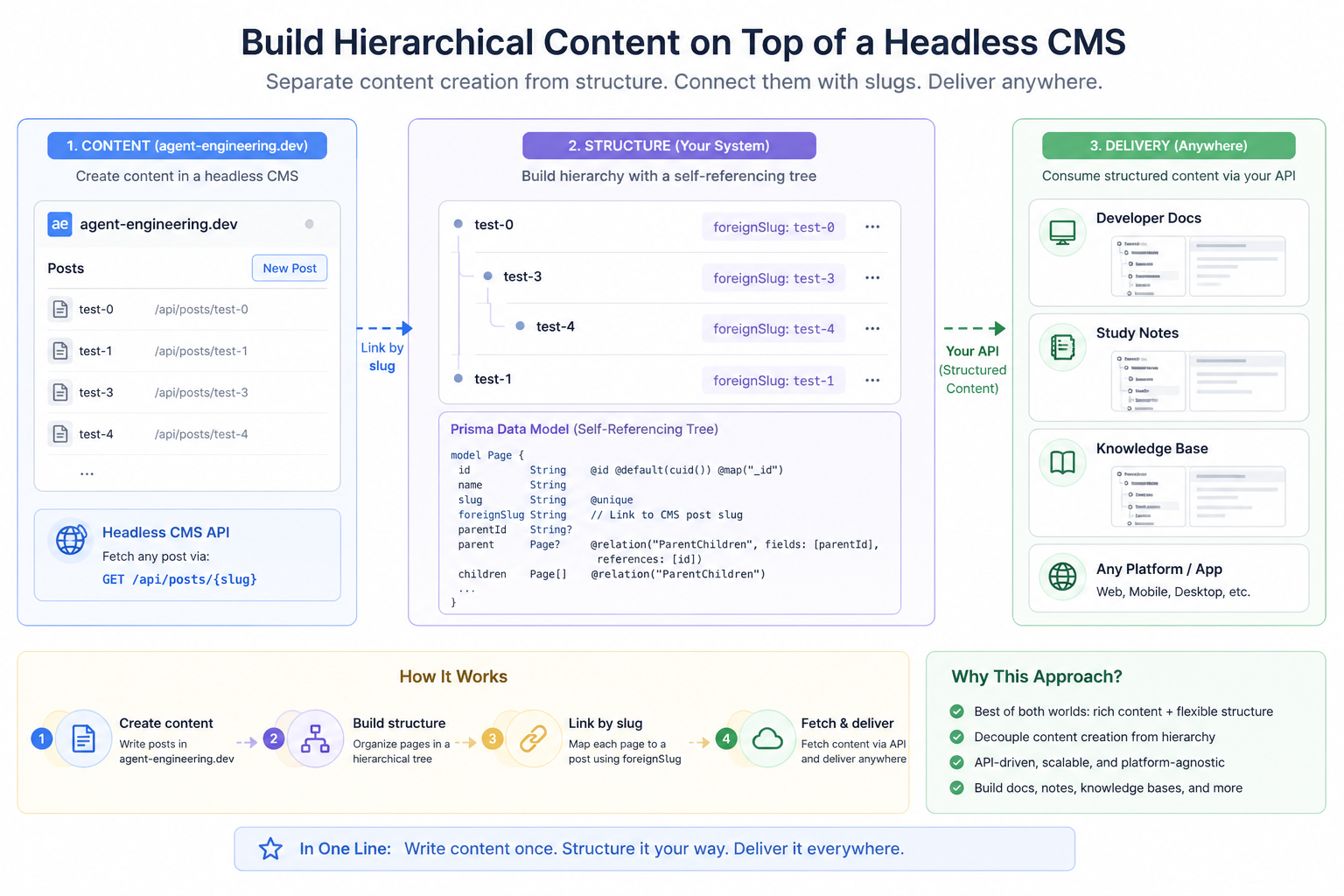
Many developers like using a headless CMS because it is simple and flexible. You can write content, store it, and fetch it through an API.
However, there is a common limitation:
Most headless CMS platforms treat content as flat.
This works well for blogs, but it becomes a problem when building more structured systems like documentation or knowledge bases.
So, how can this be solved?
Why Is Flat Content a Problem?
In real-world applications, content is rarely just a list.
Consider systems like:
Developer documentation
Knowledge bases
Study notes
These require structure, such as:
Sections
Subsections
Pages
If your CMS only supports flat content, it becomes difficult to:
Build navigation menus
Represent parent-child relationships
Organize content clearly
Flat content does not reflect how users naturally explore information.
What If Content and Structure Are Separate?
A useful idea is to separate responsibilities:
Content and structure do not have to be managed by the same system.
Instead, you can divide them like this:
Content is stored in the headless CMS
Structure is managed in your own system
Delivery is handled through your API
This approach gives you more flexibility without losing the simplicity of a CMS.
How Do You Build a Hierarchical Structure?
To represent hierarchy, you can create a self-referencing tree model.
Here is an example using Prisma:
model Page {
  id          String   @id @default(cuid()) @map("_id")
  name        String
  slug        String   @unique
  foreignSlug String
  parentId    String?
  parent      Page?    @relation("ParentChildren", fields: [parentId], references: [id])
  children    Page[]   @relation("ParentChildren")
}
This model allows:
Each page to have a parent
Each page to have multiple children
Unlimited levels of nesting
With this, you can build a proper hierarchical structure instead of a flat list.
How Do You Connect Structure to Content?
The actual content still lives in your CMS.
To connect it with your structure, you can use a field like:
foreignSlug: StringThis field maps to the post slug in your CMS.
The flow works like this:
A user navigates through your structured pages
Your system reads the foreignSlug
Your application fetches the content from the CMS API
For example:
This creates a link between your hierarchy and your content.
How Do You Deliver Structured Content?
Once structure and content are connected, your API can return structured data instead of flat data.
For example:
{
  "title": "Getting Started",
  "children": [
    {
      "title": "Installation",
      "content": "..."
    }
  ]
}
This makes it possible to build:
Sidebar navigation
Breadcrumbs
Nested pages
Multi-platform applications
Your content is now organized in a way that users can easily understand.
Why Is This Approach Better?
This solution offers several advantages.
First, you keep a strong content editing experience because the CMS still handles writing.
Second, you gain full control over structure, which allows you to design the hierarchy as needed.
Third, the system remains flexible. You can update the structure without changing the content.
Finally, it scales well. You can add features like permissions, ordering, or versioning over time.
Is There Any Trade-off?
There is a small trade-off.
You will need:
A database to manage structure
A way to link content using slugs
A simple API layer
This adds some complexity, but it is manageable and often necessary for larger systems.
What Is a Simple Way to Understand This?
You can think of the system in three parts:
The CMS is where you write content
Your system is where you organize it
The API is how you deliver it
Each part has a clear and focused responsibility.
What Is the Final Idea?
Instead of forcing a CMS to handle both content and structure, you separate them.
You write content once, structure it in your own system, and deliver it through your API.
Write once. Structure it your way. Deliver it everywhere.
Get new posts by Nelson Lin
Subscribe to receive email notifications when a new article is published.